
Did the issue with the dual core setting and the rebirth games get fixed?
I tried a few games and they all crashed, so the system files might not be updated on the online updater yet. I’m just guessing though… it could be some other issue.
1 Like
Would it be in the core options, I did see some new options that were not there before.
The system files are just additional files you need to run the core. You can get them from the RA online updater, but I’m speculating that they haven’t been updated there because I was getting a bunch of crashing even after dl’ing them. If that’s the case it’s just a matter of wait and try again later.
Also, a minor complain, the core options are still not organized as in every other recent core, it looks like the old days of RA where all core options were in a single list.
Was going to post this as I just saw it. That’s great news. Huge thanks to cscd98 and others who made this possible.
That should fix, among other things, games like Castlevania and Contra Rebirth crashing or any games that didn’t worked because you needed to disable the Dual Core option -which was not supported in the older core.
Unfortunately, it being based on an extremely recent Dolphin build means the core no longer works on Windows 8 (and any older Win version as well, probably).
Dolphin standalone dropped support/stopped working on Win 8 and older quite a while ago (5.0-16391 I believe so more than 3 years ago I think) but this is most likely no doubt due to standalone no longer working on pre Win10 as well. So I don’t think there’s a fix. Regardless, I understand it’s a very tiny minority of users at this point and compatibility between older Win versions can’t always be kept so honestly I don’t mind -And honestly, the -now older, core is still extremely usable for me for the time being.
Again, huge thanks to cscd98 for taking the time to update/refactor the Dolphin core.
edit: Just read dual core games still crashes. Yeah, might be because the core system files haven’t been updated yet.
edit2 If anyone wants to test, try editing the corresponding game’s ini in the core’s gamesetting folder. On Windows, it should be normally located in ‘system\dolphin-emu\Sys\GameSettings’.
Each game has its own ini. For example Castlevania Rebirth is ‘WD9.ini’. Under [Core] there should be an option “CPUThread = True”. Try changing it to ‘false’ if it’s not already so. See if that fixes it.
If that doesn’t fix it, maybe it’s simply a matter of the dual core enable/disable setting in the core’s menu option not being implemented yet.
1 Like
Problem with m3u reported. Can someone confirm?
And there’s still no “manual texture sampling” option for EA games (for example, SSX3). Otherwise, the videos have graphical errors (vertical stripes).
1 Like
Yeah, that’s another one that was fixed over time. Affects games like Def Jam. You can see it here as Max was using Dolphin.
I can’t test the newer core myself, but again, if anyone wants to give it a go: try this
in the game’s ini (for SSX3 for example it’s ‘GXB.ini’) add this line below [Video Hacks] or set it to false if it’s already present and set to true
FastTextureSampling = False
2 Likes
Hmm… No dice for me. Games are buggy and RetroArch freezes. Log says lots of similar errors to this one:
[libretro INFO] 19:22:441 DolphinLibretro/Boot.cpp:100 I[COMMON]: Suppressed popup: Warning - An error occurred.


IntCPU: Unknown instruction 7b888080 at PC = 805a798c  last_PC = 00000000  LR = 800698dc


  Condition: 0
  File: /builds/libretro/dolphin/Source/Core/Core/PowerPC/Interpreter/Interpreter.cpp
  Line: 313
  Function: unknown_instruction
For now, I’ll revert to the old core.
EDIT: if anyone needs the latest working version of the dolphin core, I’ve uploaded it here: https://files.catbox.moe/mtrxy6.zip
If you’re getting crashes, try deleting your old dolphin folder in ‘config’ to clear out any stale core options. You’ll want to re-fetch the core system files, too, which updated automatically once the repo went live.
The rebirth stuff is still broken, AFAIK, because they still require the dual-core stuff, which is incompatible with the way the libretro-ization works to hand off threads. That is, the updated core is still primarily the same libretro-ization, so a lot is going to be the same between the two, for better or for worse.
5 Likes
Random tip but on the subject of reverting back to a previous core version, you can keep multiple versions of the same core and be able to choose between them at will. (I have only tested this on Windows so I can’t speak for other platforms)
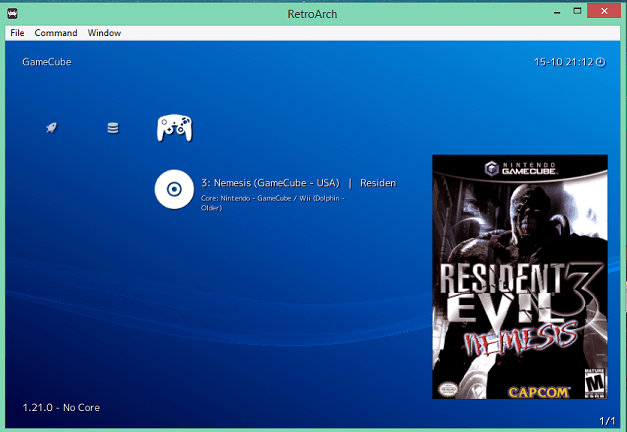
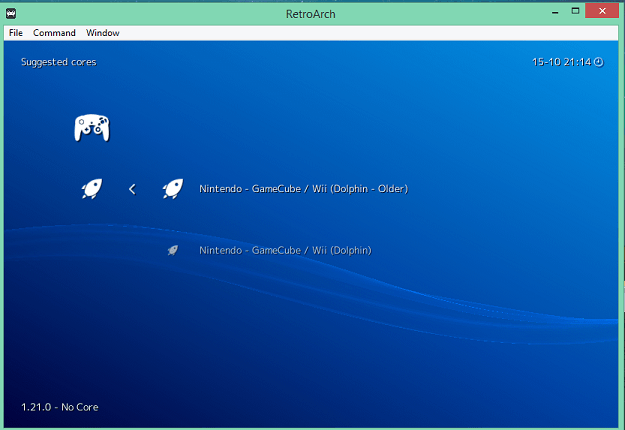
As you can see, here I made it so I can select between the latest, new version of the Dolphin core and the last (older) version of it.
In order to do so, take your older version of the core (dolphin_libretro.dll) copy it, and rename it to something like dolphin_last_older_libretro.dll. Make sure there are no spaces (use underscores instead) and also (I think, haven’t tested extensively), make sure that the name ends with ‘libretro’.
Next, copy the corresponding core info file (in this case Dolphin) located in the info folder and rename the copy (leave the original alone) to the exact same name as the renamed copy of the core’s dll. So in this case: “dolphin_last_older_libretro.info”
Third, (this is technically optional but highly recommended) you’ll want to edit the newly created info file. The 2nd line (display_name =) is used to display the core’s name info when selecting a core like you see in the second pic. Change it to something like
display_name = “Nintendo - GameCube / Wii (Dolphin - Older - Last Version)”
Finally, go to Online Updater and select “Update Core Info Files” otherwise the display name in the selectable core list won’t update for some reason.
That being said, it’s always better to make backups of older core versions regardless.
The rebirth stuff is still broken, AFAIK, because they still require the dual-core stuff, which is incompatible with the way the libretro-ization works to hand off threads. That is, the updated core is still primarily the same libretro-ization, so a lot is going to be the same between the two, for better or for worse.
So that explains it. Damn, that’s a bummer…Hopefully -if at all possible, in time a solution is found to make it work.
2 Likes
Thanks for the tip. I deleted my dolphin.opt file and things have stopped crashing so far.
2 Likes
I did all that. Unfortunately, nothing changed. Games either crash or have lots of graphical glitches. For now, I reverted everything back and locked the core.
Edit: oops, sorry. I read Drybonz reply and now it’s fixed. dolphin.opt should also be deleted and created anew. Thanks!
1 Like
This is an extremely nice tip for those of us doing some custom stuff. Do you know if we can set it up so that the configuration file or better yet, the config directory for the core can be separate too? Besides the display name, there is an internal core name and I don’t know if we can override it somehow. This way the configurations and other related things wouldn’t get mixed with old and new versions. Whenever you run the old version, the settings would break for the new one again.
No, with this method the core will use the same cfg directory. So be mindful of this and any potential conflicts (although I have not stumble upon any so far).
In the past I have tried to set up different version of the same core completely separate by changing "libretro_directory = “:\cores” with something else but apparently this is not as simple and RA really didn’t play nice with this.
It’s possible to use an alternate system directory though on a per-game basis by changing system_directory = “:\system” to something else. I often use this for more “complicated” systems; DOS/PC-98/Amiga etc basically home computers with more complex configuration/booting environment. So some games use the default system dir, the others the alternate one. Works without any problems.
Setting up an alternate config directory on a per game basis is more complicated and I haven’t really done it. The problem is when RA first loads the content it will naturally look in the default config directory if there are any config files…but then you’re telling RA to use some other config directory afterward…well you see it’s kind of convoluted and at this point you’re better off to just use a completely separate folder of RA if you just want to test things, outside of the RA folder/environment you’re normally using.
So yeah, it’s just a quick and dirty way of having multiple version of the same core and I guess conflicts could occur in some cases so use at own risk.
TL;dr If you really want to use an alternate version of a core with its own cfg and all that folders and everything done by the book, I think you’d have to actually tinker a bit with the source code of RA itself and make your own built.
Nice. So no more weird lines on EA games. Although, ideally, there really should be an option in the core’s option menu to change this instead of having to change the game’s ini. And as the user in the reddit post I linked to said, you should only disable this for games that needs it as it is slower.
2 Likes
Exactly. I’ll try to report this as well, along with the many bugs I’ve found. So far, no one’s responding to reports. I hope it won’t be like before, when no one responded to a report for years.
My next discovery is:
- A bugged toggle fullscreen option causes the entire game to freeze, along with the RA. Alternatively, a black or purple screen appears, along with the RA hang.
This post contains information about an older version of the Dolphin core. Disregard what you read in this if you’re using the updated version.
For anyone wondering, some games require fixes by toggling options that are not present within RetroArch’s UI, but you can still access them by manually inserting the correct lines in the game settings files (retroarch/system/dolphin-emu/Sys/GameSettings/).
- To find the correct game file and the fixes (if any), search the Dolphin Wiki: https://wiki.dolphin-emu.org/index.php?title=Special%3ASearch
- To know to which commands each option translates in the GameSettings files, use this guide: https://wiki.dolphin-emu.org/index.php?title=GameINI
Right off of the bat, I suggest changing the following options inside RetroArch’s Core Options, after loading any content using the Dolphin Core:
-
Shader Compilation Mode to
sync UberShaders -
Skip Presenting Duplicate Frames to
Off -
Store EFB Copies on GPU to
Off -
Texture Cache Accuracy to
Safe -
Defer EFB Copies to Ram to
Off
Close the core for the changes to be saved.
Many of those are speedhacks which can be disabled for improved accuracy, if your hardware can handle them (not very taxing, these days). You can actually go a little further, for enabling the BIOS, culling another speedhack and improving analog controls, but those are a little harder to do.
This also happens here. Although only the core itself freezes, RetroArch works fine and I can just close the content. Logs registered this, when I toggled fullscreen:
[libretro ERROR] 22:56:456 VideoCommon/PostProcessing.cpp:56 E[Video]: Post-processing shader not found: /.config/retroarch/system/dolphin-emu/Sys/Shaders/default_pre_post_process.glsl
[INFO] [Vulkan filter chain]: Updating framebuffer size 640x528 (format: 37).
[INFO] [Vulkan filter chain]: Updating framebuffer size 1341x528 (format: 43).
[INFO] [Vulkan filter chain]: Creating framebuffer 1024x1024 (max 1 level(s)).
[INFO] [Vulkan filter chain]: Creating framebuffer 1341x1024 (max 1 level(s)).
[INFO] [Vulkan filter chain]: Creating framebuffer 1341x1006 (max 1 level(s)).
[libretro INFO] 22:56:479 DolphinLibretro/Boot.cpp:100 I[COMMON]: Suppressed popup: Warning - An error occurred.

CoreTiming Event "CPInterrupt" is already registered. Events should only be registered during Init to avoid breaking save states.

  Condition: !m_event_types.contains(name)
  File: /builds/libretro/dolphin/Source/Core/Core/CoreTiming.cpp
  Line: 66
  Function: RegisterEvent

Ignore and continue?
[libretro INFO] 22:56:479 DolphinLibretro/Boot.cpp:100 I[COMMON]: Suppressed popup: Warning - An error occurred.

CoreTiming Event "SetTokenFinish" is already registered. Events should only be registered during Init to avoid breaking save states.

  Condition: !m_event_types.contains(name)
  File: /builds/libretro/dolphin/Source/Core/Core/CoreTiming.cpp
  Line: 66
  Function: RegisterEvent

Ignore and continue?
Alt-tabbing works fine.
2 Likes
You could get the sys folder from the standalone, to get all the latest per-game fixes.
Also, do the Ubershaders even work in this core? I’m still getting shader cache stutters no matter what.
1 Like
Thanks for the tip about the GameSettings.
I’m not sure about Ubershaders here. I still have a little bit of stutter, but things are mostly smooth, though I play on native resolution. If I’m remembering right, Dolphin says stutters are vastly diminished, but not gone; it depends on the strength of your hardware.