
Also, hello everyone. I am having an absurd amount of trouble finding the right settings to use for Shovel knight to align the scanlines correctly. I’m using a 1440p screen and running the game with DXVK and Special K in HDR. I’ve managed to figure out that a 225 vertical resolution is mostly correct, but I have no idea why this is when the game runs at 400x240 natively. The 1:1 scaling also does not work how I imagined it either. If using that setting, I should be able to set the horizontal resolution to 240 to align the scanlines, but that does not work. I’ve tried fiddling around with random numbers, but none of them work. The best result I’ve gotten is setting the game to fit and using guest’s integer scaling with the resolution set to 400x225. However, there are still some issues with screen warping when viewing horizontally scrolling segments. Using CRT-royale on reshade can get good results when in the 1:1 scaling by manually setting the display box to equal multiples of 400x225. I have no idea what is going on here.
Hi,
there was a bug in my update that fixed now https://github.com/Jobima1st/CRT-Guest-ReShade/blob/Jobima1st-patch-25-11-30-r1-fix/Shaders/CRT-Guest-NTSC.fx
and I also see these bugs in your fork so I did this reply so you can fix them too 
Ty for letting me know!
Some of these changes appear to diverge from upstream, so you may want to double check on those:
crt-guest-advanced-ntsc-pass2.slang
	vec2 ofactor = OutputSize.xy/global.OriginalSize.xy;

old reshade
	float2 ofactor= OptSize.xy/OrgSize.xy;

new reshade
	float2 ofactor= NewSize.xy/OrgSize.xy;
(Replacing float3 xd=dx; int loopstart=int(TAPS_3_phase-loop); with float3 xd=dx; int loopstart=int(32.0-loop); does match upstream.)
Edit: @PU786 and i did some testing. While these two changes diverge from upstream, they are necessary to fix that integer scaling bug.
crt-guest-advanced-ntsc-pass2.slang
	texcoord.y = texcoord.y - VShift*global.OriginalSize.w;

old reshade
	texcoord.y = texcoord.y - VShift*OrgSize.w;

new reshade
	lexcoord.y = lexcoord.y - VShift*OrgSize.w;


deconvergence-ntsc.slang
	texcoord.y = texcoord.y - VShift*global.OriginalSize.w;

old reshade
	lexcoord.y=texcoord.y - VShift*OrgSize.w;

new reshade
lexcoord.y=lexcoord.y - VShift*OrgSize.w;Oh, and please do feel free to adopt the changes i made to the parameter order to match upstream.
The consistency is nice, and the collapsible categories are a great QoL improvement in my opinion.
Totally needed, yes.
the ofactor change happen in OG CRT-Guest-NTSC Aspect Ratio and I did miss port it back then
and about other changes, I think the new updates are matching upstream
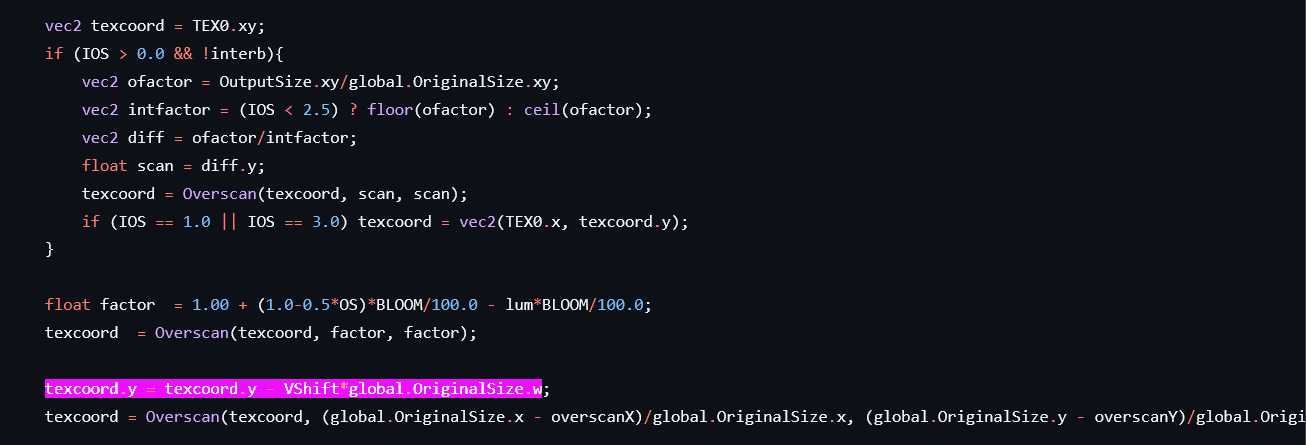
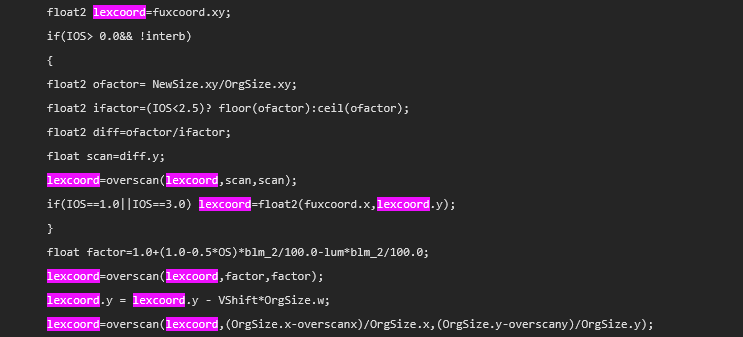
keep in mind reshade port sometimes use new naming
I maybe do it in my JobimaCRT_guest_advancedV8 (feel free to do it with https://pastebin.com/eJ2KaruX and post it so I can update it as V8.24b )
not for CRT-Guest-NTSC.fx since the parameter orders is done by DevilSingh that way (dont know why, and I respect his decision so I dont think I will change it)
I didn’t go through and change the defaults to your new ones, but everything else should be all set:
It doesn’t seem like there was any particular intentionalality behind the order DevilSingh had the settings in, so i am very much inclined to match upstream. That is your prerogative for the version you are maintaining tho shrug.
I didnt update it since I made JobimaCRT_guest_advancedV8.fx so you (or anyone) can adopts it
thanks you! update is done https://github.com/Jobima1st/Jobima-Presets/blob/ManualUpdates/Jobima%20crt%20guest%20advanced%20V8.24b%20presets%20for%20reshade.rar
.
Hi @Guilherme, is it possible to update https://github.com/Guilherme-Tavares/reshade-pcsx2-auto-resolution to set the original fps too? it’s now OriginalFPS in my last update, similar to Resolution_X or Resolution_Y
Looking great! Just a couple of maybe accidentally separated “Color Tweaks” categories:
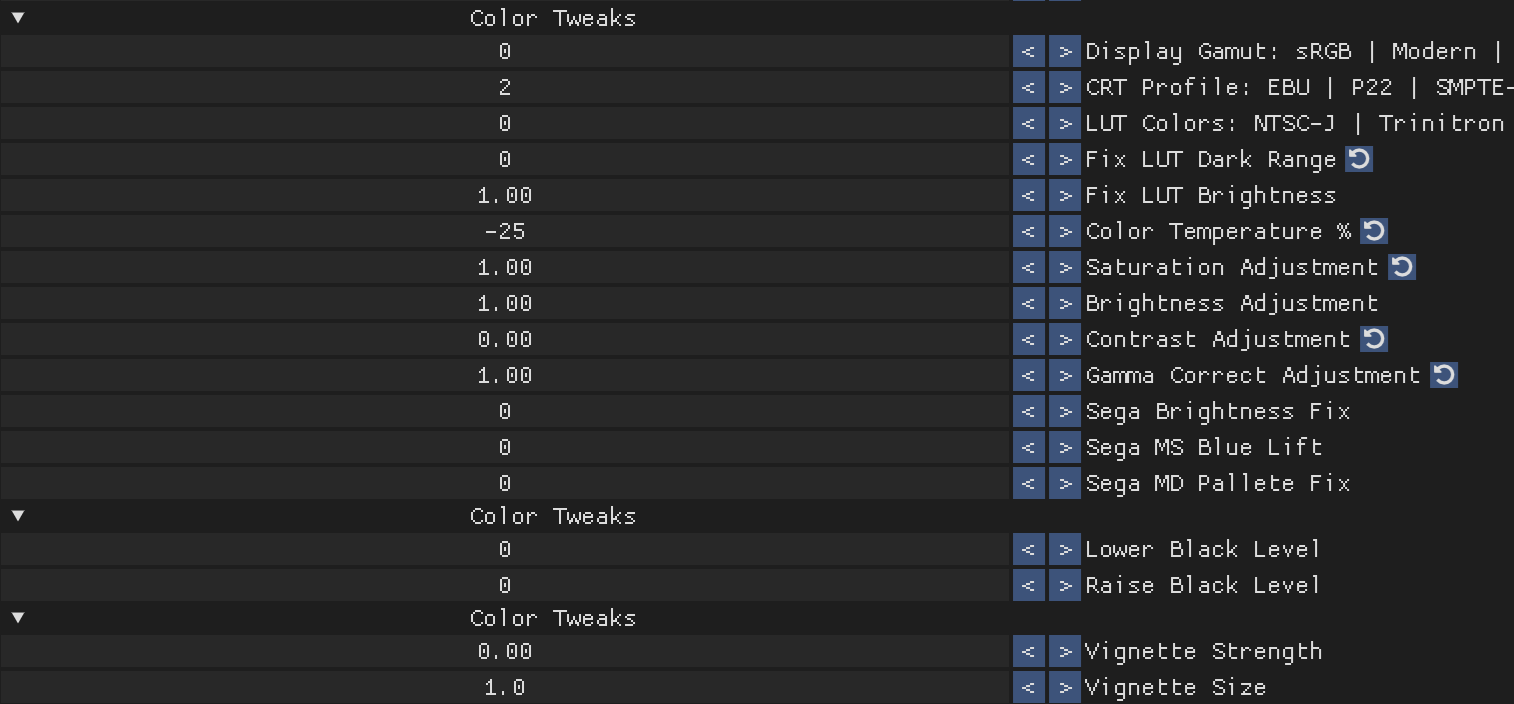
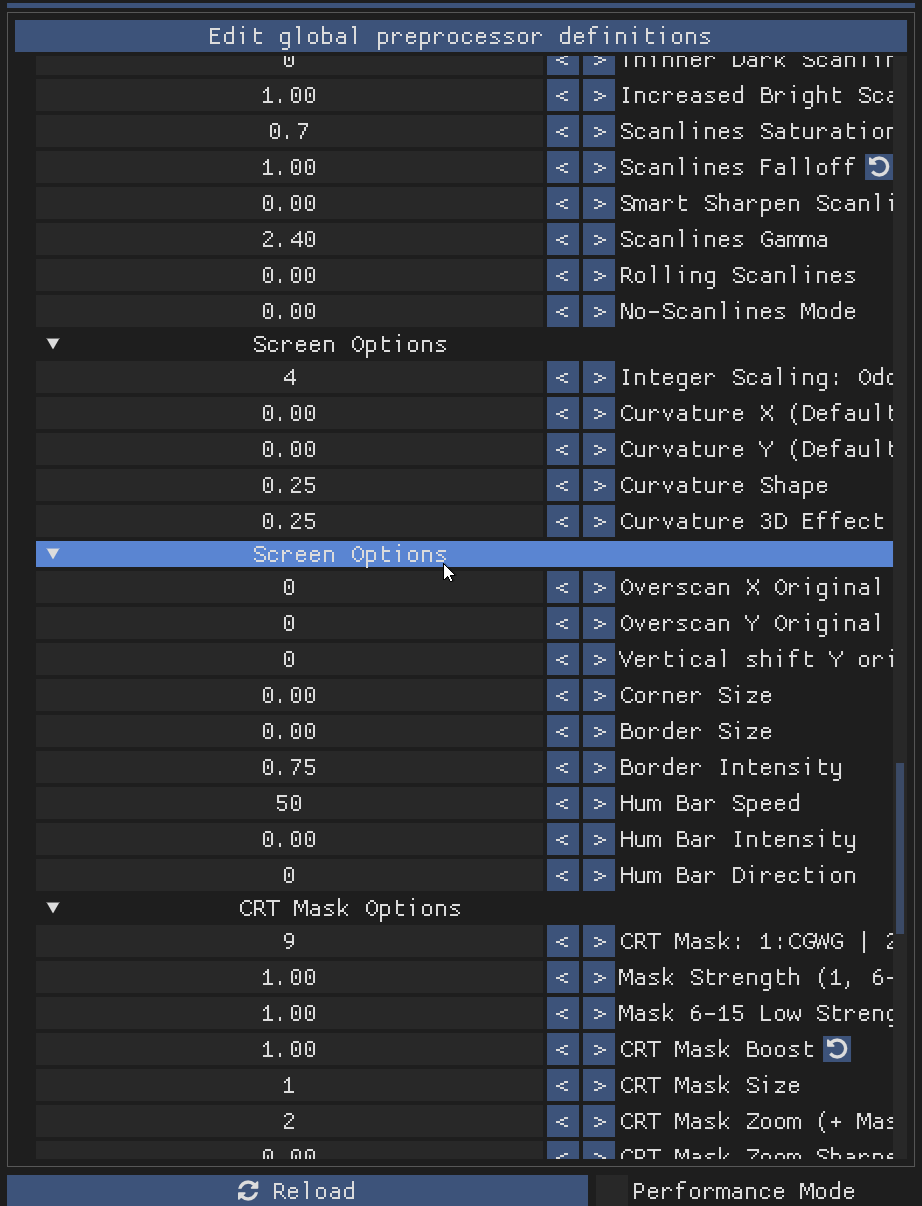
And “Interlacing Scanlines Saturation” is in the category below where it should be.
@Jobima since your versions are going to be the up to date and best working set from here on out, it would be best to name it back to CRT_Guest_NTSC and have the OG default options set. (as good as your defaults are for a default, my brain is wired to a certain baseline when I make a mistake and revert certain options back to Default, so it’s a big help to not wonder if an option is Guest’s default or not)
I think it’s good your preset is indeed available still though, so maybe a separate file you keep up to date as well?
You two both do incredible work @Azurfel @Jobima, thank you so much for the passion and quality you both bring into the community.
it’s not just the defaults, I did add my port of crt-black_crush-koko to it too
anyone (like Azurfel) feel free to back port it to original CRT_Guest_NTSC
OK…but if he does that, are you going to include it in the branch you update for the future? Like this time with the repeat work for the option organization, following around someone else’s work to double work in the community is a pain and then divergence can happen when one person loses steam.
People’s motivation can run out, people lose interest, or get burnt out, etc.
sure, he can do PRs in github
Fixed.
@Jobima https://pastebin.com/dii2GgZv
Yeah, at some point soon, i will update my fork for CRT_Guest_NTSC, CRT_Guest_PAL, Decoupled_Guest_NTSC, and Decoupled_Guest_PAL.
The most impactful of the recent changes upstream have been the Sega additions, which i don’t consider to be particularly useful for ReShade use tbh. So i hadn’t considered it to be a priority, but fixing the integer scaling bugs is much more critical.
thank you again! done https://github.com/Jobima1st/Jobima-Presets/blob/ManualUpdates/Jobima%20crt%20guest%20advanced%20V8.24c%20presets%20for%20reshade.rar
CRT-Guest-NTSC, CRT-Guest-PAL, Decoupled-Guest-NTSC, and Decoupled-Guest-PAL have all been updated to match crt-guest-advanced-2026-07-23-release1 on my branch.
Azurfel/CRT-Guest-ReShade at PAL-ParamReorg-Decouple-Update
@Jobima Looks like there are two #defines that are slightly different from upstream in JobimaCRT_guest_advancedV8 if you want to get those matched up:
#define rgb_m float3x3(0.2989,0.587,0.114,0.5959,-0.2744,-0.3216,0.2115,-0.5229,0.3114)
#define yiq_m float3x3(1.000,0.956,0.621,1.000,-0.272,-0.6474,1.000,-1.106,1.7046)
I also moved the “float4 InterlacePS” section to match the current technique order. Shouldn’t change anything functionally but it feels more correct.
Beyond that, i think we should be all synced up for simplified comparison and collaboration at this point.
All settings names, defaults, and ranges have been fully harmonized with upstream.
Defaults match the following slang shader presets:
- CRT-Guest-NTSC = crt-guest-advanced-2026-07-23-release1/crt-guest-advanced-ntsc
- CRT-Guest-PAL = crt-guest-advanced-2026-07-23-release1/crt-guest-advanced-pal
- Decoupled-Guest-NTSC = decoupled-guest20260911/decoupled-guest-advanced-ntsc 0-Svideo
- Decoupled-Guest-PAL = decoupled-guest20260911/decoupled-guest-advanced-pal 0-SCART
@Jobima Harmonized settings names and ranges for JobimaCRT_guest_advancedV8.24d, with your defaults left functionally unchanged.
(“NTSC Merge Fields: Auto | No | Yes” and “CRT Mask: 0:CGWG | 1-4:Lottes | 5-14:‘Trinitron’” were adjusted to the harmonized equivalents of your previous defaults.)
Hmm. Took a bit to find the issue, but it does seem to break the masks with “(Transform to) Shadow Mask” enabled. I’m seeing if i can fix it before reverting.
Edit: Changing float mwidth=mwidths[int(shadow_msk)]; to float mwidth=mwidths[int(shadow_msk+1)]; does fix it, but feels a dash kludgey for my tastes.
I think we should roll with that if we can’t find a better solution tho. Matching upstream’s setting exactly is worth a little kludge if necessary imo.