Here it is.
There is still room for improvement, if there is interest I may improve it. Tell me what you think

Here it is.
There is still room for improvement, if there is interest I may improve it. Tell me what you think
I tested the core; seems to work as intended…except I only get a black screen (with a pause icon in the upper right corner).
Tested with AM2R. I get sound; the game reacts to the gamepad inputs -everything seem to works fine…except for the black screen.
I’m on Win 10 (build 1909) so it should meet the requirements for WGC stuff from what I read. I even tested with a virtual machine Windows 10 OS…and it actually worked there, no black screen. Of course, performance won’t ever be great on a VM but at least that rules out an hardware or core problem. Vulkan, GLcore, D3D11…same results.
So, any ideas? I love the idea behind this, it could be a great core.
That’s strange. I’m on Windows 11 and everything works without black screens. Claude sees two main suspects.
Quote:
winver , and, if possible, try updating Windows 10 to 22H2.In the meanwhile I post two new screenshots from a homebrew done with Game Maker called Shantae and Asha - Dream Fantasia taken from Retroarch with the core
Next step, if those two tests aren’t enough:
Ok so, the pause icon was indeed RA indicating it was “paused” (forgotten what it was since I normally always have “pause” unbind so I never use it, but here I was testing on a clean/new RA install). While RA was “paused” the exe was still playing. Anyway, the “pause” issue was fixed by disabling both “Pause Content When Menu is Active” and “Pause Content When Not Active”…unfortunately, it didn’t fix the black screen problem.
I tried switching from game mode to menu mode with ctlr+shift+f12 (an icon appears indicating the shift between both modes)… black screen still. Only difference is in one mode it accepts keyboard inputs and not in the other.
edit: Forgot. Also tried switching between WGC and PrintWindow in the core’s options (restarting afterward). Same results.
edit2: Oh yes, I also tried ShaderGlass itself, since (guessing) maybe Claude made the core based on ShaderGlass (at least in part) perhaps. ShaderGlass worked right out of the gate, so the problem isn’t here either.
What’s perplexing is that it works fine in the VM Windows 10…which normally is much less functional in terms of video drivers supported and such. I forgot which build the VM guest OS is but it’s pretty much up-to-date (and it doesn’t have Nvidia driver installed on it either)
So this has me thinking, it’s likely a problem with my Windows 10 build version or an issue caused by the Nvidia Driver and/or control panel/settings.
Whenever I get around of backing my current OS (am using Acronis True Image for backups semi regularly), I’ll tried updating Win 10 to see if that fix the problem. Well, I should probably just start by uninstalling the Nvidia driver first to see if that is the issue.
If more people were testing the core it would be easier to understand if the problem is in the core or on your side. I’m on WIN 11 with Nvidia graphic card and everything is fine.
For now try this: before using Retroarch, set the game to ‘window’ or ‘borderless’ mode via its graphics options, or try Alt+Enter. For 2D games with pixel graphics, it is generally best to choose the lowest resolution if this option is available.Close the game and launch it from within Retroarch.
Let’s see what happens.
I don’t get a blackscreen on Win10 with Nvidia (older RA 1.17.0), made some quick test using Vulkan driver with an old PC game. Putting shader on and clickthrough worked. Interesting alternative to other approaches, thanks.
Nice, this worked with some games:
But I couldn’t get it working with Sonic Mania Plus. The exe doesn’t seem to launch at all, and it sends me back to RetroArch’s menu.
I think this core needs its own thread at this point, it seems quite promising.
EDIT: Ok I got it to launch by changing the game display mode to windowed, but I get a frozen image or black screen. The same problem happens with AM2R.
Holy moly -that did the trick (setting the game to run in a window beforehand).
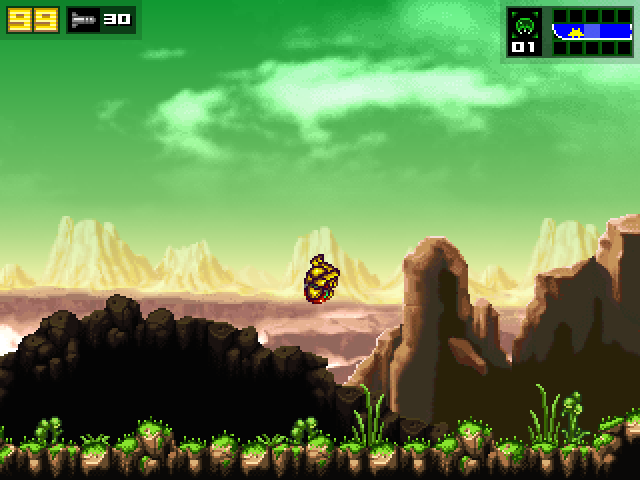
(Screenshot captured with RetroArch)
The only hiccup for me right now is frame pacing. It’s not 100% smooth - it oscillates from smooth for about half a second then bouts of jittery-ness for half a sec then smooth etc. Tested with AM2R only for now.
edit: Double checked when playing the game/exe by itself to see if everything is scrolling smoothly and yeah, scrolling is smooth when playing the exe alone.
Agree.
to Starman99x. After putting the game in windowed mode close it. After having closed it launch it from within Retroarch. Also don’t forget to switch from menu mode to game mode with Ctrl + Shift + F12
to Broski86 I post some screenshots of Sonic Mania and AM2R showing that in my rig everything shows fine and move at stable 60fps. try tinkering with the options and see what happens.
“I think this core needs its own thread at this point, it seems quite promising.” ok, but please help me. Not only do I have the programming skills of a chimpanzee, but I’m also a complete klutz when it comes to this sort of thing
Just start a new thread, name it whatever you are calling your core, then in the first post place some screenshots and usage instructions for people, then let the discussion start. If you make it, they will come.
To solve frozen image or black screen never forget:
Settings → User Interface: the option ‘Don’t Run in Background’ or ‘Pause when Inactive’ must be set to OFF. If it is enabled, RetroArch will pause as soon as the game takes focus.
Alternatively, set pause_nonactive = ‘false’ in retroarch.cfg.
Impressive!
Also, since when is AM2R 16:9+? The original release was confined to 4:3, if I recall.
File is in trash.  I can’t download and test.


