

Duimon - HSM Mega Bezel Graphics and Presets - Feedback and Updates

Duimon_MB_Logo

! ! ! Big Flashy Important Announcement Heading ! ! !

There will be some big changes coming to my repos.

I noticed while cloning my main repo as a test, that although the size of the data is only ~800 MB, over 4 GB was downloaded. :hushed:

The biggest culprit was the splitting off of the Potato presets and graphics. Git enables me to reverse changes if I want, so the data is still there. (Along with many other large graphics updates over that last 2 years.)

Going forward I intend to recommend the Git installation as the preferred method, so I needed to fix the issue.

Instead I broke it and a pull no longer works. :frowning_face:

My solution will be to delete my repos and start from the current base.

The first step is to create new “Legacy” repos to host the final releases of my legacy presets.

This is done.

The next step is to delete the main repos and publish the most recent versions. This will happen in the next day or two.

Obviously this will force anyone currently using the Git update method to reinstall. For those of you who have made any changes to files… I recommend making a backup of your folders. Nothing has changed yet so you can just copy your files back in later. A regular pull won’t write over any extra or edited files. (Only a “force” pull will.)

My apologies for any inconvenience but it needed to be done.
12 Likes

thanks to your foresight in naming the overlays the right way … i added the wildcard feature and use now the high res vector preset as a base :sweat_smile:

2 Likes

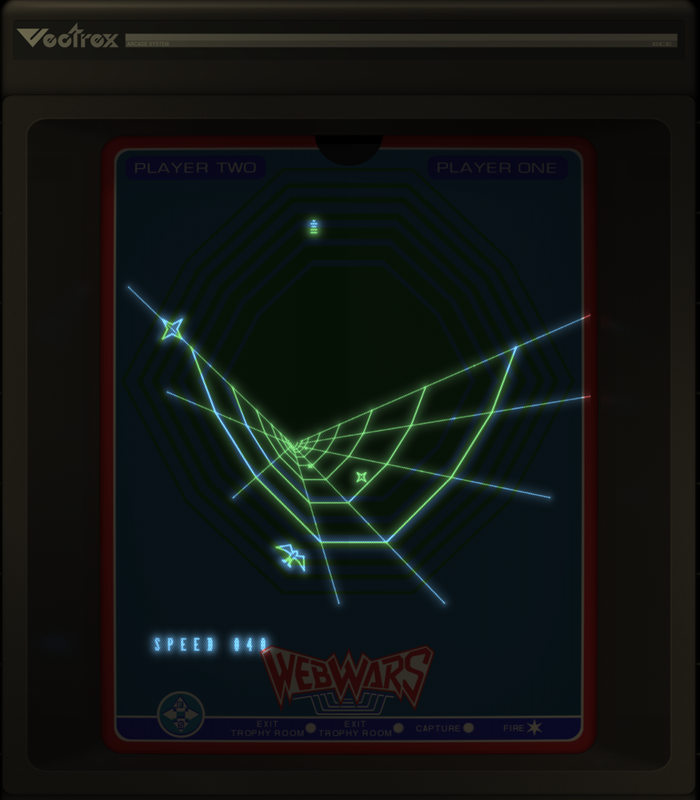
That looks nice… is that Vectrex?

1 Like

Looks cool, I’ve got a question for anyone who has seen a Vectrex in person recently.

In images it seems like the lines appear bright white then bloom and fade to blue at the edges.

Mind you I think this one might actually have a blue gel on top, but it goes to white in the middle which I’m not sure might just be the overexposed area.

I’m wondering what it looks like in person. I’m guessing it’s something like it’s a cold temperature white, and in the center it goes to white because it’s bright enough that you don’t see the color anymore?

For our vector presets we are pretty much pumping out 100% color, so if there is a green gel on top in the center 9f the vector line it will always be some sort of green, and never go to white

Basically I’m trying to think of how we could make things look more “real” looking, maybe it just needs a brutal amount of bloom added? :rofl:

2 Likes

Maybe. There may also be something we can do in the different Gel parameters.

What we really need is a dedicated vector preset, created by one of our preset masters.

3 Likes

Duimon_MB_Logo

The Duimon-Mega-Bezel repo and release are updated to v1.1.0.3.

The Potato repo and release has also been updated to v1.1.0.3.

Changes:

  • The repository has been reset using the current base.
  • FB-Neo [CABINET][NO TILT] image path has been fixed.
  • Added a “Params” folder containing copies of my presets without a base preset reference.

The link to the current releases are in the first post. Installation/Update instructions are near the end of the second.


The surgery went well and a fresh clone will only download ~800 MB for the main repo. :partying_face:

A note about the “Params” folder.

I included it mainly because of upcoming features in RA, although it can also be used as an alternative method for applying community Mega Bezel derivatives.

Keep in mind that I think the proper reference order is for community preset references to follow the reference to my presets. (To avoid replacing essential parameters in the community preset.)

In all cases I will only offer support for using community Mega Bezel derivatives with my [Bezel] presets.

4 Likes

I’m guessing it’s actually like a very light blue and the glow is a much darker hue. I’m just basing this on my memories of how vector style games looked, in general… so I could be wrong. But mostly they would be a much lighter line with a darker glow… probably just looks more white in the photo.

3 Likes

Here’s a pretty nice Vectrex shot.

I think the deal is that the overlay was far enough away from the screen that some diffused glow is added to the overlay.

This would be exclusive to the vectrex among vector games

4 Likes

This is what I think is interesting, it’s white in the middle and the glow seems to be blue…

image

2 Likes

Somehow the glow would have to take on the hue of the gel layer.

1 Like

It looks a lot different than the vector arcade games… they didn’t have much glow at all.

1 Like

Duimon_MB_Logo

The Duimon-Mega-Bezel repo and release are updated to v1.1.0.4.

The Potato repo and release has also been updated to v1.1.0.4.

Changes:

  • Changed the file extensions in the “Params” folder from *.slangp to *.params.

The link to the current releases are in the first post. Installation/Update instructions are near the end of the second.

4 Likes

I would like to reflect a bit on all that has happened since I added this comment to my second post.

It amazes me all the things I have done in a support role, as opposed to creating graphics.

  • Captured 1357 screenshots for my GitHub pages gallery.
  • Created the boilerplate presets.
  • Fixed countless bugs found during the conversion.
  • Added countless QOL changes during the conversion process.
  • Migrated the QOL changes to the Potato graphics.
  • Wrote the first of many guides.
  • Reset the repos to slim down the Git installation method.

Rest assured that I will eventually get back to creating new graphics. Before that there are still a great many things to do.

  • More specific guides, including one on upcoming RA features.
  • Making use of upcoming RA features. (This will require a deep dive into some presets, and some specific changes to all.)
  • Creating some new overlays and separating them into categories for use with screen-only base presets. (One of the guides will detail their use.)
  • Setting up a workflow and creating some YouTube videos of my presets in action.

These tasks, combined with offering general support in the forums and feedback to my team, will keep me busy for quite some time.

I can honestly say that I’m having the time of my life. :partying_face:

Every support task that I perform feels like a leap in the overall quality of the project, and brings me great satisfaction. :grin:

A big thank you to all that have provided feedback over the months, it means a great deal to me.

This is an really exciting time in the shader world and I feel blessed to be a part of it.

14 Likes

You answer a lot of noobie questions too, Duimon… and have been a real help to me.

3 Likes

back to the vectrex

swapped the overlays to the toplayer for this …and added a blue gel image …

maybe the easy way to archive a better result is to ad a second gel image layer ? so you could have one to archive the blueish glow and another to combine this with the overlay colors :thinking:

edit

another try to archive this with changed monochrome amber hue

with overlay

without (but too blue in the middle )

another try with the second setting this seems to combine the colors closer to the og… :thinking:

4 Likes

@Duimon I think even if you never created another graphic again, all of the troubleshooting and general input you have provided to so many people and projects would be enough for all of us to be super thankful to you for. You are one of the solid blocks in the foundation of this community.

6 Likes

I think, if we wanted to do something for this (And I’m not sure we should.) we would need a new glow section in the Gel parameters with it’s own multiply blend.

Then we could lower the multiply on the lines, and maintain the multiply (Color of the gel.) on the glow.

4 Likes

What ever happened to this bezel idea?

1 Like

I used it until HSM developed the built in masking so we can just take screenshots of our live presets.

The layer group is still in my old overlay source.

3 Likes

Hello, how do I correct this bezel?

1 Like