
Yeah, last shader pass with 1080p resolution is commonly 1440x1080 big, but the “backbuffer” is like 1920x1080, so there is a " “hidden” default conversion pass" with RA video driver. RGBA 10/10/10/2 to RGBA 10/10/10/2 should go very predictable.
3 Likes
There is a disconnect between hdr_v2.slang and the built-in SDR-HDR10 converter. The built-in doesn’t have a configurable ‘display gamma’ and color space setting. At first I suspected that this was the cause of the brightness expansion in my SDR vs. SDR-in-HDR screenshot, but need to confirm with some tests. In any case, the gamma parameter should either be exposed in RA settings or kept constant for alignment with the shader’s intent to do exactly what RA does.
The default value should be 2.4, not 2.2. This aligns with current best practice of mapping SDR to HDR using BT.1886 for linearizing (which simplifies to a 2.4 power function in this case).
There is also the wide range of color output options, but it doesn’t have BT.2020 for some reason (simple passthrough). These options should align with the RA menu, too.
2 Likes
I agree that it would be reasonable to expose the setting without requiring shaders, but the question of which setting should be default is a little complicated.
The standard SDR gamma on desktops and smartphones is 2.2, most monitors default to 2.2 gamma last i knew, and most setup guides suggest 2.2 last i knew. So generally, it is 2.2 that will match the SDR output on the same device.
It should be noted that modern displays accept a 10-bit SDR signal without complaint, even if they don’t support HDR in many cases, and i think that is what @kokoko3k’s primary target is.
Expecting hdr.slangp or hdr-config.slangp to be appended to the end of every WCG and/or 10-bit shader to make them work correctly with HDR on is a solution, but that needs to be widely and clearly communicated.
There are clearly shader devs making SDR WCG and/or 10-bit shaders, who do not have the necessary hardware to test the HDR output, who have been surprised to find that they accidentally made an HDR-aware SDR shader.
I don’t think this is a display gamma issue. Neither 2.2 nor 2.4 display gamma applies to HDR10. A display in HDR10 has a different gamma from both 2.2 and 2.4.
The reason I believe 2.4 should be used is because it is closer to the inverse of the 0-~0.5 part of the PQ encoding so that the data is passed through without changing brightness. I need to do some tests to confirm this, but I believe this is what is causing the brightness expansion in the SDR screenshots I posted earlier.
As far as i know, the “gamma” setting in hdr.slangp and hdr-config.slangp is content gamma, and thus the equivalent of the gamma setting on your display in SDR. Whatever you have the SDR mode on your display set to, should be what you need to set gamma to in hdr.slangp and hdr-config.slangp for matched output (assuming that both your SDR and HDR modes are reasonably accurate).
At least on my setup, SDR shaders in HDR approximately match RetroArch’s SDR output if i set hdr-config.slangp to 100/100/2.2/boost:off/709.
This doesn’t match the Windows SDR in HDR conversion, mind, because that uses the wrong gamma on purpose (that uses piecewise sRGB instead of the standard 2.2 decoding gamma, because someone at Microsoft is very attached to being wrong about the difference between encoding gamma and decoding gamma.)
1 Like
Yes agreed any differences that have crept in need to be aligned again and we’ll move to 2.4 (if we haven’t already tbh I thought I had)
2 Likes
Expecting hdr.slangp or hdr-config.slangp to be appended to the end of every WCG and/or 10-bit shader to make them work correctly with HDR on is a solution, but that needs to be widely and clearly communicated.
All the field does that you were proposing is append an extra hidden shader pass to the end of every 10bit/16bit shader - its the same thing under the hood (and again there isn’t such a thing as a WCG shader from RetroArch or Windows perspective). It would be a unique field people need to know about and wouldn’t make sense on any pass just the last.
This way, with hdr_v2.slang, we’re being explicit about the additional shader pass, we’re using the language of the presets every body is comfortable with and we’re giving shader authors much more control - its a win win IMO.
It should be noted you only need to add the shader pass if you dont want to have to deal with HDR. Its purely a convenience thing. From a performance perspective and correctness you need to deal with HDR internally in your shader. Its really for shaders that the authors have long lost interest in.
1 Like
No his 16bit float swap chain buffer format will be dithered down to 8bit (a 24bit signal). HDMI 2.0/Displayport 1.2 only support that bandwidth at 60hz and so Windows will always do that. It doesn’t know the cable standard being used and so is conservative - it might know the ports at best.
You maybe able to force SDR to 10bit via driver settings with some professional graphics cards like a Quadro but not for consumer cards.
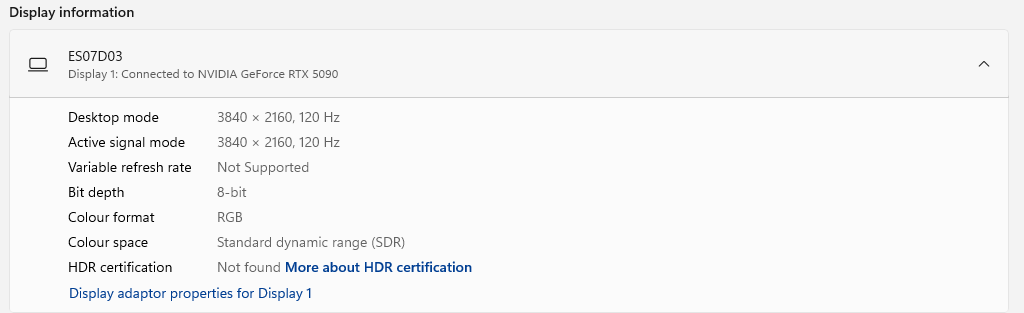
Here’s my advanced display settings in Windows using SDR where you can see 8bit depth:
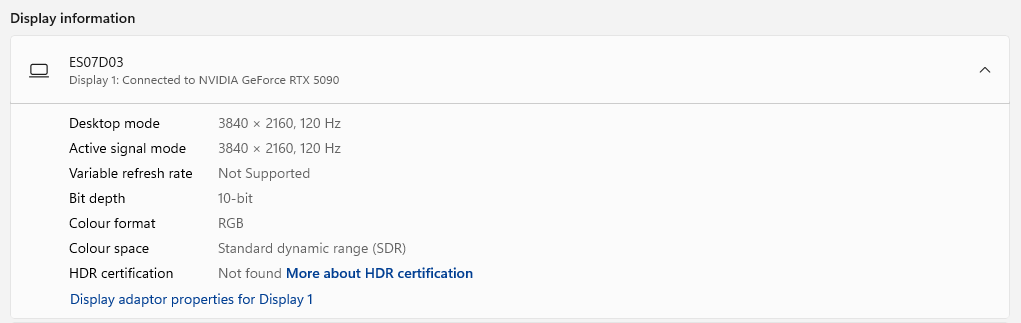
and for HDR 10bit:
and just in case you think the display resolution and refresh rate maybe limiting things (as I thought might be possible) here’s it all turned down and its still 8bit:
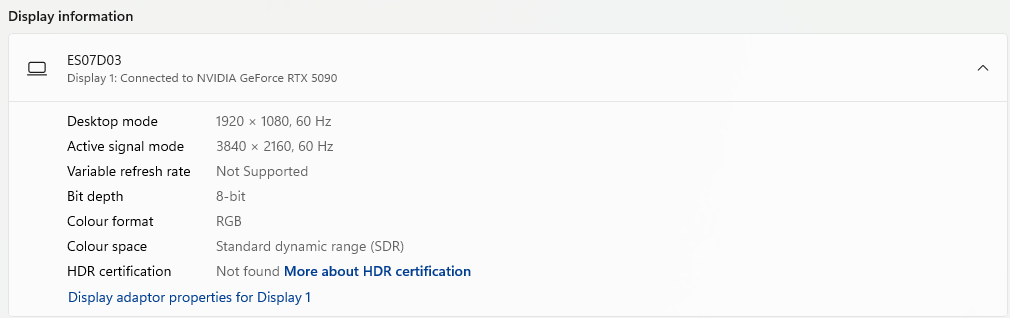
I will say its interesting that its saying the active signal mode is 4K still at 1080p - I would expect the signal to be 1080p and the monitor upscales it rather than the PC - maybe that is what its saying.
You can set 10-bit color depth in NVCP. I do that on both my TV in SDR and monitor (which doesn’t support HDR at all) and they both show a 10-bit input signal on their info screen. I think you need HDMI 2.1. I don’t think HDMI 2.0 will work.
2 Likes
Oh dear. This may explain a number of things actually.
1080p SDR 120hz on my system:
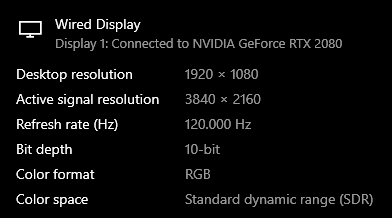
4K SDR 120hz
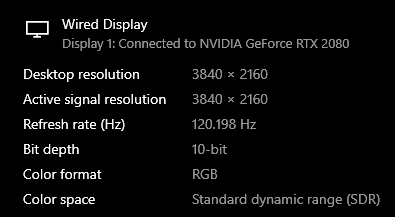
and 4K HDR 120hz
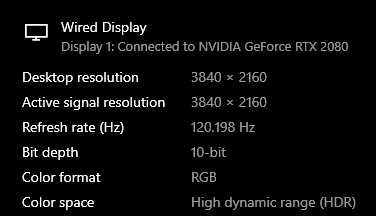
HDMI 2.0 is not adequate for modern displays, including your ES07D03.
You may be using an underspec HDMI cable, which would mean that your setup cannot properly display 4K HDR at 120hz. Check if you are getting full 444 chroma resolution for 4K HDR 120hz here. I strongly suspect that you are not.
You generally want to let the GPU handle your upscaling actually, as that offers more options and gives better results. For example you can get perfect 1:1 integer/nearest neighbor scaling with these settings:

2 Likes
Its my colour space which is wrong not the bit rate (im using DisplayPort) as you can see. Its running 4K at 120hz fine and the 6bits difference wouldnt account for 2x bandwidth increase even if that were true. I wonder whether my monitor is actually reporting this incorrectly to Windows as my HDR is all correct as per liliums test tools that youre using.
Its interesting that you’re getting 10bit in what its says is SDR, what monitor are you using? Is it a TV?
Also its not sub chroma compression as Id see that very obviously with the Sony Megatron.
Yes as Ive shown above its not a colour depth problem or bandwidth issue its my colour space being incorrectly reported.
Ah I think I see the problem actually - its that my monitors HDR certificate hasnt been found and its just saying my colour space is SDR because of that - its still sending a 10bit HDR signal and so the monitor is still able to output HDR.
So this brings us back to the bit rate: at the very least the largest percentage of people will be seeing an 8bit signal sent to their monitor in SDR (by the sounds of it youve overriden that in your graphics drivers). So in the normal case it will be dithering down to an 8bit signal in SDR.
So I found the driver override option and I now too have been able to force it into 10bit mode in SDR (there’s no hardware issue). I still stand by the argument that maybe at best 1% of users have overridden this and the default is very much an 8bit signal for SDR and a 10bit signal for HDR. I couldn’t name you a game for instance that gives you an option to output a 10bit or 16bit SDR swap chain they will all be outputting an 8bit buffer and so this basically effects only things like Photoshop (for which I doubt the large majority of users still wont have overridden this setting) or koko’s shader that will still be dithered down to 10bit even when the override is on.
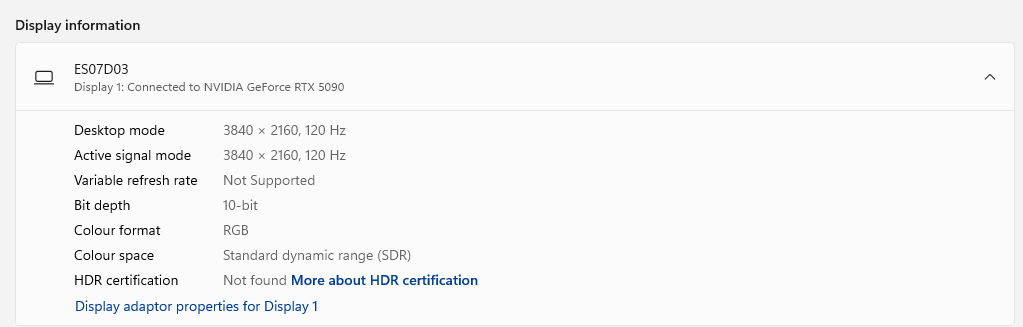
That’s just Windows though. Macintosh has also supported 10-bit for years, and now their iMac in-built displays also support it natively. So the native SDR texture format on Mac can be considered 10-bit in many cases.
2 Likes
Why is this so surprising? All of these options have to do with the capabilities of the display and it’s EDID information as well as the capabilities of the output device. When set to default, the NVIDIA control panel usually detects and selects the highest quality colour settings at any given resolution and refresh rate combination.
I have old TVs that are not HDR but use 10-bit panels. My 1080p Toshiba Regza supports 10-bit 60hz 1920x1080, while my 4K LG IPS with Passive 3D supports 10-bit at 1080p 60 or (I think) 4K 24p but not RGB 444 Full or 10-bit at 60Hz, probably due to chipset limitations. . My new TCL supports up to 12-bit, whether it’s 10-bit+FRC or native 12-bit is another story as its unclear.
My old LG OLED supported 10-bit as well and using Colour Control allows you to select NVidia’s temporal dithering algorithm in Windows which is something that I think is usually exclusive to Linux for some reason on regular GeForce cards.
1 Like
Yes maybe and so to appears does Windows with driver overrides but nobody uses 10bit SDR - the only place I can see any reference to it is if you switch on 30bit mode in Photoshop preferences. But we’re talking about games here and every single one outputs 8bit.
Its because 10bit SDR isnt a thing outside of professional graphics and even then I think its extremely rare. There’s not a single game that will output a 10bit SDR swap chain.
The use case for 10-bit output format is to do color correction without introducing banding. Any sort of color correction reduces dynamic range. If you take in 8 bits of data, transform them, and output 8 bits, you can lose precision. If you output 10 bits, you are less likely to introduce quantization error. Dithering can mitigate this, but it’s not perfect.
While 601 to 709 conversion doesn’t need this precision, NTSC-J+D93 to 709 absolutely does, and it just so happens a lot of very popular old games are Japanese. Another use case is accurate Game Boy Color reproduction. People with 10-bit displays can benefit from both of these without needing HDR. 10-bit is not even analogous to wide gamut. I have a plain sRGB monitor and it takes 10-bit input.
So question for you, HDR is off: if driver is set to 10-bit output and last shader format is 10-bit, is last shader pass the swap chain? I assume yes. If the last shader format is instead 8-bit, what happens? What is the ‘default’ format (no format pragma set)? Does RA do any dithering on its own of any kind?
1 Like
As a layman who was always after the highest quality output that their hardware could output, I always selected the highest quality output that was available, even if I didn’t fully understand the implications or proper application of such. Most of the time I just never want to leave potential quality improvements on the table.
We’re talking about games in the context of RetroArch and Sony Megatron but in the wider context of how I have my PC setup (and possibly others) and how Nvidia selects default colour formats and precision, it’s a lot more than just games we’re talking about here.