
Sony Megatron Colour Video Monitor

You can’t just use any combination of scale factors, Masks and Scanline patterns and expect a moire free experience. Sometimes things don’t align properly e.t.c.

You might have to adjust the Scanline Dynamics in some cases.

I use Integer Scale in both the X an Y axes. You can try that then adjust the scale factors until you find the one that’s closest to the screen size you want that doesn’t have the moire pattern.

Sony Megatron Colour Video Monitor’s Scanline gaps cut hard. Even the thinnest gap completely obscures the Phosphors behind it, which can sometimes lead to undesirable interactions between the scanline gaps and the mask “wires” / lines / slots, which is another potential source of moire.

If only there could be a correction or optimization in the Z order of the Mask/Phosphors, Slots/Wires/Grille and Scanline Gaps, we might have a bit of an improvement there.

Right now it seems kinda flat and 2 dimensional with these limitations on the Z order.

Maybe a future implementation might bring about a more 3 dimensional approach with blending or opacity adjustments depending on which layer order the object/element is in.
2 Likes

Ok so I’ve tested it on my Android tablet and it works - scRGB is not supported (kind of to be expected on Android as you probably dont want people trying to use it) but with HDR10 it works fine. Sadly I haven’t got Linux to hand to try it on. Do you have the ability to poke around inside the code as having looked at the code the only thing I can see to do is not display HDR if its not available Im going to add this test - at least it will honestly say whether the driver supports it or not on your machine, we can then start to figure out why it was working.

2 Likes

Ok so put in surface support and menu hiding - now only shows scRGB if its supported and hides menu entirely if neither modes are supported. HDR10 is the more common format because its the format sent to your monitor ultimately.

So my theory is that this difference in capability is due to you running it natively vs inside flatpak. Inside flatpak the bundled Mesa could be higher than the one sitting outside it and so hence the difference in HDR capability.

1 Like

Thanks for the advice. Before I noticed this, I had only encountered moire patterns in shaders with curvature, never in a flat shader, so I didn’t even know it was a thing. I was surprised when I saw it and then was able to reproduce it on (the also amazing) CRT-Guest-Advanced.

I had also already tried Integer Scale Axis Y + X, and even completely disabling scanlines in both Sony Megatron (changing Scanlines Min/Max to 2.00 and Scanline Attack to 1.00) and CRT-Guest-Advance (Scanline Type to -1 and No-Scanline Mode), but even so the pattern is still there, so it seems to be entirely related to the mask strength (in Guest-Advanced the mask strength around ~75% the pattern is not noticeable).

I think that, as a workaround until I get a better monitor, I’ll use the scaling and resolution options, and these shaders will be the first thing to test when I have the new monitor in hands (I have a window of a few days to return it if I’m not satisfied).

Thank you all for the help and advice on this.

3 Likes

Unfortunately not, I don’t have any skills with code.

Your theory about the bundled Mesa in Flatpak makes sense, I should have considered that sooner and done more testing. I’ll update the Mesa package and see how it goes (I was already planning on this before I started testing this).

And I’ll also be keeping an eye out when the new PR is merged and a new nightly release drops to try it.

1 Like

So, that does the trick. The procedure for testing was the following:

  • I cloned and compiled from the main repository: all HDR options appear (Off, HDR10 and scRGB are listed as options), the colors are always washed out unless set to Off.

  • I cloned and compiled from your MajorPainTheCactus:fix-vulkan-hdr-first-frame-renderpass-mismatch branch (from the new “HDR: Per-mode capability detection and menu visibility” PR), no HDR options appear.

  • I updated Mesa in the system: in RetroArch compiled from your branch, only the HDR10 option appears, the colors are as are in stable from Flatpak (e.i., mostly correct, there’s still the missing metadata issue to take care of that).

So, it seems in fact it was a combination of two issues, an outdated Mesa (my fault) and the previous PR listing all HDR options, even when unsupported. Once your PR “HDR: Per-mode capability detection and menu visibility” get merged, it should take care of that.

Thank you very much!

1 Like

If it has anything to do with the backlighting system it should also show up if testing solid coloured test screens even with or without shaders. It could be that there’s an issue with the edge lighting. Maybe the visible lines are where the leds are actually present and not just the diffused light.

3 Likes

So it’s probably not this, but just to check: make sure you have integer scaling on, and disable all overscan cropping options (in both Retroarch’s “Scaling” options section, and in the options for the core you are using.)

Use a shader such as Image Adjustment to mask off the overscan area without cropping it.

4 Likes

V2.8.0 Sony Megatron Shader

Another day another update… This time I found a bug in the scanline generation using rec2020 - basically when you transform r709 pure green (0.0,1.0,0.0) into r2020’s equivalent green (0.33, 0.92, 0.09) and then start applying individual CRT beam transforms on them you shift chromacity which is incorrect.

I missed this because it only effects the darker outer edge pixels of a scanline the peak brightness center pixels are fine which is what I was looking at most often. The fix is to do the scanline generation in r709, then transform to r2020 and then to apply the mask. Sounds simple but required a large rewrite of Sony Megatron. So hopefully we’re all straight with colours now - no white point shifts as we move through colour spaces and no warping of colours as we transform them for the individual CRT beams.

scRGB and CRT masks

So another point I’ve realised on my travels is that scRGB fundamentally will not produce strict CRT masks. The reason is the windows compositor will transform (rotate) the strict mask colours across the sub pixels to send it over the wire ie it will take a pure green say 0.0,1.0,0.0 and rotate it into r2020’s equivalent green 0.33, 0.92, 0.09. HDR10 doesn’t do this as it passes straight through and it will adhere to the mask i.e. across four pixels for an RGBX mask we get: (0.33, 0.0, 0.0), (0.0, 0.92, 0.0), (0.0, 0.0, 0.09), (0.0, 0.0, 0.0). We’ve got scRGB now but I am wondering whether it was worth the effort… lol Anyway I added a note to the HDR selection screen to make users aware of it.

3 Likes

Thanks for the advice. Integer Scaling is always on (I tried it in both scaling axis) and I had already tried the overscan cropping options before, both in the core and in the RetroArch settings, and a combination of both. And I also tried other cores as well. Unfortunately, it didn’t work.

I think Cyber’s comment above, about perhaps it being an issue with edge lighting, is what makes the most sense to try explain what is going on here. For example, with the UI completely transparent, when moving the image center in RetroArch>Settings>Video>Scaling>Viewport Anchor Bias X, I can see that the lighter blue area remains in the same place, even if the image and the shader/mask move right or left.

What puzzled me was that it only is visible in blue areas and with strong mask. If the mask is no visible (in Sony Megatron, by changing the Display Resolution and TVL), the moire pattern disappears, if I lower the mask strength (in Guest-Advanced), same result, no moire pattern anymore. Edit: oh yeah, and also by changing the subpixel layout to RWGB takes care of it almost completely, but this monitor is a conventional IPS with RGB subpixel layout.

4 Likes

By your wording, you may be considering this to be a distinct issue, but just in case: i am still seeing the inaccurate colors with impure primaries compared to the shaderless output with matched gamut.

This may actually be part of the issue, and perhaps even suggest a solution. Shouldn’t that be “(0.00, 0.0, 0.0), (0.33, 0.92, 0.09), (0.0, 0.0, 0.00), (0.0, 0.0, 0.0)”? Since a pure green primary should only directly illuminate the green “phosphor”?

This would presumably require that primaries be defined per gamut, so that the correct “phosphor” balance could be mathematically derived, but if that is workable, this would presumably get color accuracy back up to “Colour Accurate” levels, if not even better.

OK great so I need more info than that - what are you viewing? with what settings scRGB/HDR10? Can you taken a screenshot of both and tell me what colour values are off?

So in HDR there is no such thing as shaderless - we dont directly write to the back buffer, theres a shader in between (that could be at fault as well) so are you comparing SDR mode to HDR mode?

I bet even then you’ll see difference because of luminance differences caused by the scanline simulation but lets figure out what you’re seeing and where it might be coming from first.

Sure you can do that - its what we had in fact but that breaks the CRT mask: we want one sub pixel in each pixel to represent one phosphor of the CRTs phosphor triad i.e:

Red: ((0.63,0.00,0.00),(0.00,0.07,0.00),(0.00,0.00,0.02),(0.00,0.00,0.00))

Green: ((0.33,0.00,0.00),(0.00,0.92,0.00),(0.00,0.00,0.09),(0.00,0.00,0.00))

Blue: ((0.04,0.00,0.00),(0.00,0.01,0.00),(0.00,0.00,0.90),(0.00,0.00,0.00))

Yellow: ((0.96,0.00,0.00),(0.00,0.99,0.00),(0.00,0.00,0.10),(0.00,0.00,0.00))

Cyan: ((0.37,0.00,0.00),(0.00,0.93,0.00),(0.00,0.00,0.98),(0.00,0.00,0.00))

Magenta: ((0.67,0.00,0.00),(0.00,0.08,0.00),(0.00,0.00,0.91),(0.00,0.00,0.00))

White: ((1.00,0.00,0.00),(0.00,1.00,0.00),(0.00,0.00,1.00),(0.00,0.00,0.00))

Black: ((0.00,0.00,0.00),(0.00,0.00,0.00),(0.00,0.00,0.00),(0.00,0.00,0.00))

From these original r709 colours in r2020 space:

Red: (0.63,0.07,0.02)

Green: (0.33,0.92,0.09)

Blue: (0.04,0.01,0.90)

Yellow: (0.96,0.99,0.10)

Cyan: (0.37,0.93,0.98)

Magenta: (0.67,0.08,0.91)

White: (1.00,1.00,1.00)

Black: (0.00,0.00,0.00)

In our original colour setup as per your reply white would come out as:

(0.63,0.07,0.02), (0.33,0.92,0.09), (0.04,0.01,0.90), (0.0,0.0,0.0)

Which is wrong I think. White r709 in r2020 is still (1.0,1.0,1.0) as above

1 Like

It’s the same issue i was talking about here. Nothing has changed since then. Literally all colors have been clearly incorrect on my display using every version from Megatron 2.6.5 on, regardless of settings.

I have generally been using test images from the SNES version of the 240p Test Suite for testing purposes.

If i toggled shaders off and on with Megatron 2.6.2, the colors approximately matched. Shaders toggled off also approximately matched RetroArch running with shaders toggled off in SDR.

Colors aren’t even close to matching when doing this with any version of Megatron from 2.6.5 on.

Define “breaks the CRT mask” in this context please. Because i’m starting to suspect that may be what i consider correct, hardware-accurate behavior.

That is: if only the pure primary color red (255, 0, 0) is on screen, only red phosphors should be lit, right?

1 Like

So how I test the Sony Megatron and the internal hdr shader (and vice versa) in HDR is to turn on off shaders to compare the internal shader Ive written with the Sony Megatron and I always make sure they match. So in order for that to match though the correct version of Retroarch has to be the same as the correct version of the Sony Megatron. At the moment the very latest version of Retroarch and the very latest slang shaders as per github would be needed. Im not sure if you just get latest nightly and download the slang shaders in Retroarch you would get the latest sony megatron so make sure youre getting the shaders from slang_shaders github repo directly.

We should definitely get to the bottom of why we’re seeing differences: another test is to switch on/off scanlines in HDR10. Switching on/off when no custom shaders are applied will allow you to match the internal shader with and without scanlines (this will allow us to find issues excluding the sony megatron in the scanline generation). Then turn on scanlines and turn shaders on/off with the sony megatron in default settings - this should allow you to match the sony megatron identically with the internal shader. This should pin point whete any difference youre seeing are coming from.

Switching scanlines on/off doesn’t work for comparisons, since the Luminance settings need to be substantially higher for scanlines/Megatron than they should be for baseline output.

I consider our baseline for “correct” HDR output to be shaders off, both Luminance settings at 100, Colour Boost to Accurate, and scanlines off. Those settings are a (color) match for Retroarch in SDR with shaders off using Windows’ SDR to HDR conversion (but not a gamma match, because the Windows SDR to HDR gamma is wrong on purpose.)

Alt tabbing between one instance using those settings, and another instance with the internal scanlines on and the Luminance settings at 670, the internal scanlines have the exact same color accuracy issues as Megatron 2.6.5-2.8.0 with equivalent settings.

Straight along, all of my testing has been done using the latest nightly build unless i specifically stated otherwise, with shaders downloaded directly from the github repository and placed into renamed folders for versioning purposes (so Megatron 2.8.0 is hdr280, for example).

1 Like

Also, thinking on it, i’m pretty that was the correct behavior? We aren’t trying to pass-through the Rec2020 white, we are simulating the phosphors of our target gamut, which additively cause us to perceive the balanced combination of red, green, and blue as white.

1 Like

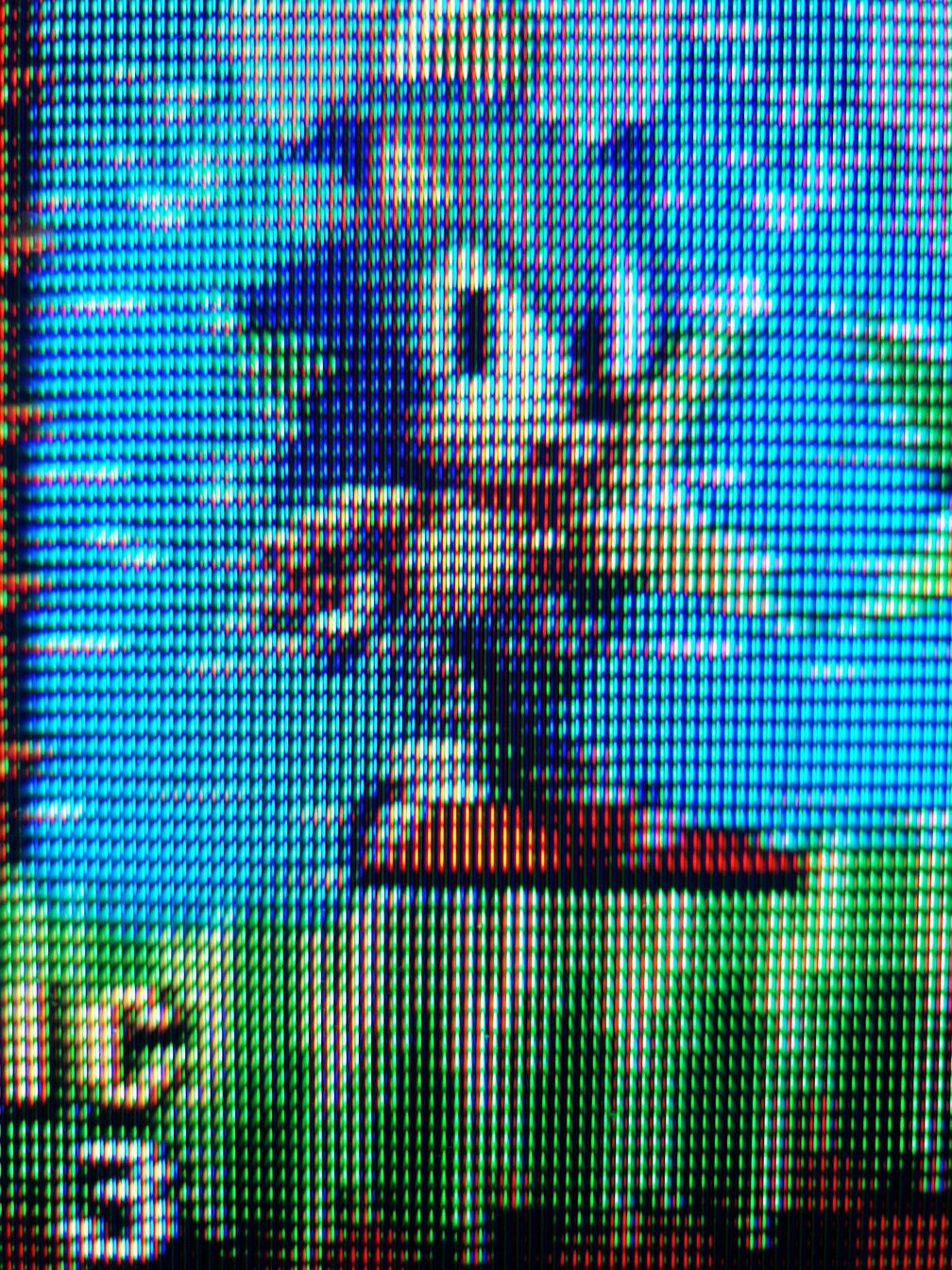
To give another example of hardware accurate color primary behavior, @Hyllian posted a useful image of Sonic the Hedgehog running on a Sony 21FS140 here.

Note that in Sonic’s right shoe, and in the darkest patches of grass, only a single color of phosphor is illuminated. The unlit phosphor colors are visible only due to reflected/refracted light (which is why they are unbroken lines with no scanline gaps).

If we look at a direct capture from the game (using Genesis Plus GX):

sonic primaries

we can se that Sonic’s right shoe is a pure red (239, 0, 0), and the darkest patches of grass are a pure green (0, 101, 0):

sonic primaries 2

In Megatron 2.6.2, the resulting simulated phosphor pattern was more or less identical to the one seen in @Hyllian’s photo (aside from the unlit phosphors, which Megatron currently has no option to simulate, nor am i convinced that one is needed in practice):

In the portions of the image with a pure primary color (the shoes and the darkest patches of grass), only “phosphors” of that primary color are illuminated, just as was the case in the 21FS140 photo.

Megatron 2.8.0 instead illuminates literally every single simulated phosphor to one degree or another in every part of the image that isn’t full black:

which seems like the expected result of the “Mask Accurate” methodology as it has been described to me (that is, if a pure red is split across all three “phosphor” colors, it makes sense that all three “phosphor” colors would be lit up).

I am not certain this is solely responsible for the color inaccuracy i have been observing in Megatron 2.6.5-2.8.0, but it has certainly made me strongly suspect that “Colour Accurate” also had the more accurate masks all along.

I think you might have it backwards. AFAIK, “mask accurate” should be the one that ensures that the right number of subpixels are lit, so you have the right mask, even if the colors are wrong at a macro level, while “color accurate” ensures you have the right colors at a macro level but the mask is going to look wrong because the subpixels of the host display are not the same color as the phosphor primaries.

If I’m the one who has it backwards, or I otherwise misunderstood the topic of discussion, please disregard :slight_smile:

That was what i had assumed was the case too, until recent discussions suggested otherwise.

I’ve always found that the “Mask Accurate” setting had the same issues Megatron 2.8.0 has for me, with inaccurate colors and all simulated phosphors being lit up even in primaries. That is part of the reason i always recommended Colour Accurate.

1 Like

Not looking to get into any long debate about this here but upon finally getting proper RWBG/WOLED support in Sony Megatron Colour Video Monitor, which was something that I had advocated for after experiencing it long before in CRT-Guest-Advanced via Mega Bezel, WOLED users including myself noticed additional subpixels being lit in our photos virtually every single time, so we’d see maybe orange or yellow (or sometimes other colours) in between the R-G-B and could never get proper R-G-B triads despite supposedly finally getting support for the subpixel layout and mask that had worked for years before when using CRT-Guest-Advanced.

This predates your arrival to this thread. If you go back and read the old posts and view the photos which document the history of the RWBG implementation, you will see that the original Colour Accurate Mode always looked wrong in WOLED users’ photos.

Unfortunately MajorPainTheCactus didn’t have such a display to test with, so he relied on our reports and testing.

I complained about that issue and he implemented the Mask Accurate Mode, which resolved it. I have been grateful for it ever since.

You came along a while later and when you tested my Preset on your OLED TV, things looked very off to you, unlike anything I had ever seen or any other user of my Presets or Sony Megatron Colour Video Monitor had ever reported or posted before. That is also documented here.

Almost immediately upon your arrival you’ve been advocating for Colour Accurate Mode to be used and that Mask Accurate is unnecessary, not accurate and should even be removed.

Just stating what has been observed and documented here but I do implore you to go back and see why we needed a Mask Accurate Mode in the first place.

For LCD Displays it wasn’t necessary and the comparison photos taken using those didn’t exhibit the same additional subpixels being inserted into the mask like the WOLED Displays’ photos were.