I also said this before
1 Like
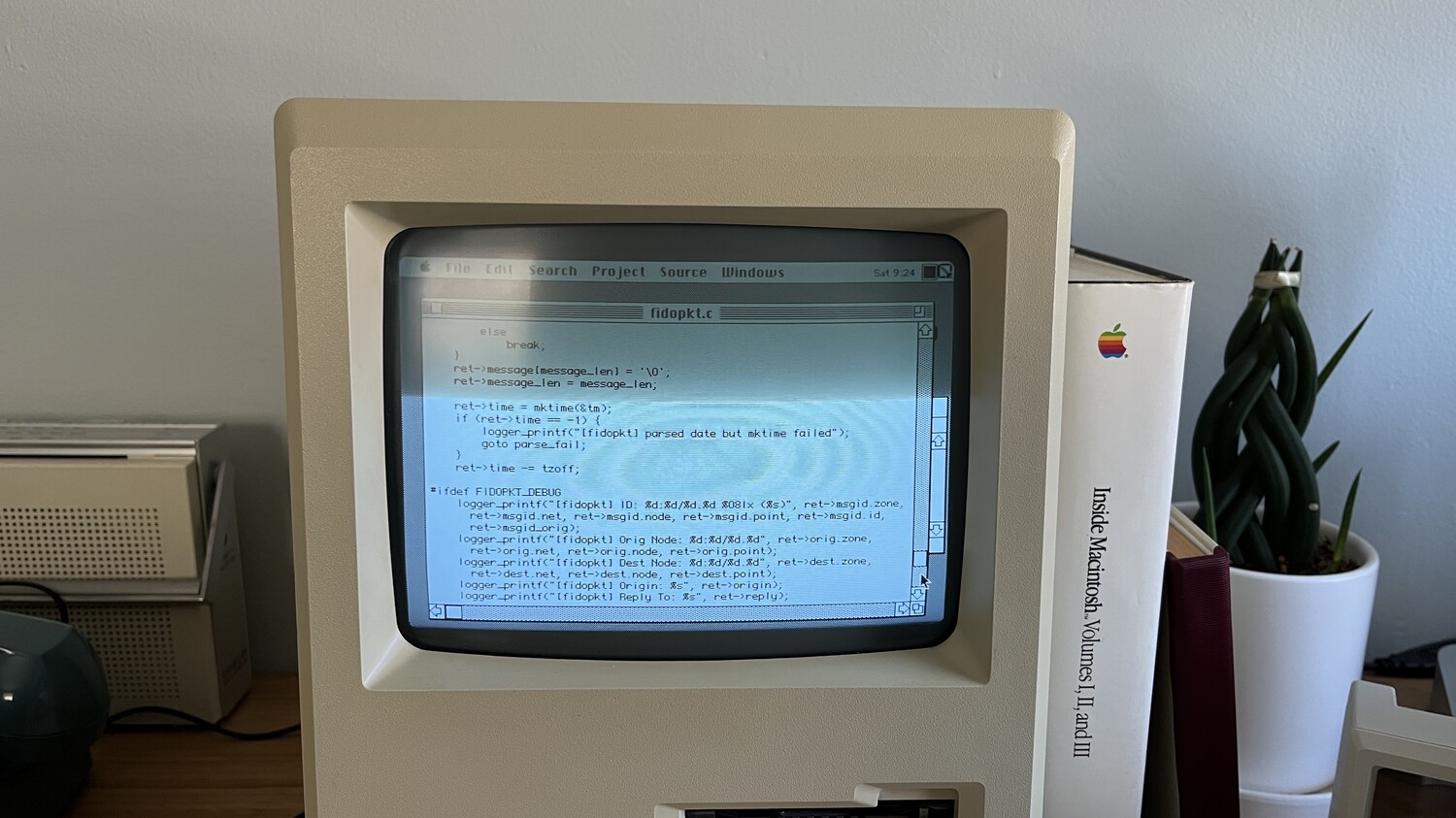
In my experience, glow on a CRT is not just a camera effect. As other people in this thread have suggested, it might be related to a dirty screen or some age/wear-related problems. Maybe a black matrix, microfilter, etc. might have an effect.
Or maybe I’m hallucinating this. Lol
On my 1985 and 1989 CRTs which have gray screens instead of deep black ones whenever powered off, they still have a bit of a gray afterglow even after powered off, showing a blurry afterimage of whatever was on-screen. When I turn the lights off in my room, the screen is still emitting (or reflecting?) a tiny, faint amount of light. This entire effect probably isn’t significant enough to consider emulating, but it’s worth thinking about in this discussion.
3 Likes
If it has to do with phosphorus but doesn’t mention the name of the effect, someone mentioned the name in a Vogon forum, but I can’t find it.
Saturated colors in digital cameras overwhelm the CMOS sensor, producing a ‘defect’ known as Blooming.
The halo of CRTs is somewhat different. Even though it is completely transparent, it always causes refraction, but in this case, they are not; they have a thin film. I suppose the reasons are: to appear flat, anti-static, and to darken the image (making blacks blacker).
In a well-lit environment, a monitor with gamma 1.8 cannot be perceived, but with the light off and a black background image, it is blatantly obvious. What’s more, if you look closely at the image, you can see the silhouette reflected in the glass.
This is not a memory, it is suffering; calibrating these monitors was painful.
2 Likes
This is caused by the thermal contributor to phosphor decay (phosphor decay has three components), and I purposefully stop it from happening by forcing my phosphor shader to go down to 0. Otherwise it gets stuck due to a lack of floating-point precision.
There was a very good IEEE paper about the security issues of thermal after-images.
2 Likes
I don’t know who will agree with me, but in my opinion, many CRT effects (and even analog video effects in general) add a dynamic and lifelike (teeming with life) quality to games. Perhaps we used to dislike these effects, characteristics, or even limitations, but today we appreciate their value after losing them in the age of digitization and ideal screens
I know I am not alone who felt this way, there are others
also I noted many younger peoples use effects that make their videos (in youtube or whatever) get analog artifacts or crt effects (especially scanlines or curves, and sometimes even masks) or even film artifacts although they did not live through those times, so this is not just a nostalgia
2 Likes
about Convergence adjusting in flyback
I remember it was in SONY only, in other TVs it was Focus, or I am wrong?
anyway I kinda like a bit of misconvergence in shaders, it kinda give nice effect, also I think you can’t get 100% convergence in real CRT, at least there will be some differences around the screen areas
1 Like
Something I just remembered:
- Partly filtered YPbPr (allegedly Sony 2000s would filter Pb/Pr but not Y)
- Filtered YPbPr (Panasonic CT-36D30B, appears to do Y trap filter and slight C lowpass)
- YPbPr with a delay line, causing Y to be out ot sync from Pb/Pr (Toshiba/Orion)
- Filtered Y in S-Video (Panasonic again)
2 Likes
We should probably document accessible controls as well. Just about everything had a picture/contrast and brightness control. In addition:
Most TVs have a color, tint, and sharpness control.
Some older color TVs have a grayscale control that either presets to a sepia tone or allows control of the tint of monochrome video.
Most computer monitors have an H-Size, V-Size, H-Pos, V-Pos control.
Computer monitors can have a variety of electronic geometry controls, including trapezoid, pincushion, rotation, and parallelogram.
Factory calibration button
Color temp controls, including presets and custom by setting Red proportion and Blue proportion (on some monitors, blue is fixed and the controls are Red and Green).
Professional monitors usually have an underscan control that reduces H-Size and V-Size by 5-10% to show the entire picture frame. They also have a blue-only button, and sometimes a gamma control.
3 Likes
I cover a lot of the geo controls in the analog-service-menu shader
4 Likes
One control that I could remember tweaking on AOC CRT monitors was a focus knob. I don’t think it was accessible without removing the cover though.
https://www.reddit.com/r/crtgaming/comments/123gedg/how_to_adjust_brightness_and_focus_on_pc_crt/
https://www.reddit.com/r/crtgaming/comments/zuffub/adjust_crt_focus/
1 Like
Arcade monitors had this too.
1 Like
Focus seems practically like magic when you get that used CRT and think “it’s kinda blurry”/“why are scanlines on the edge instead of center”?. Screen knob is useful too.
1 Like
I notice it in PAL VHS Tape (recorded by me in 2001) cap
or https://files.catbox.moe/w0i5qw.mp4
is not only flyback but also in the signal itself?
Not really, indeed the gray bars stay the same color.
What do you see?
yes but it kinda loss some brightness and get closer to black (specifically the bottom bar)
here with crt filter to show what I see more clearly or https://files.catbox.moe/4pkddi.mp4

Another thing most shaders do wrong is curvature, i mean the bezel, sure, it’s curved but the actual image is perfectly flat even on a curved screen. What you seen in front of you on a curved CRT is a perfectly flat image with curved corners.
1 Like
The image just before your post proves the image is curved as well, or I am missing something (?)