
Ngl, As much as I love The Erdrick trilogy HD-2D, I can’t stand the pixelation in those games. Like hell nah.
I mean, you can hook up a CRT TV (or monitor) to a computer, and, iirc, RetroArch even has support for that built in, if you want to go that route.
That’s unnecessary amount of work, smh. I still have my RCA in the other room the problem is no component input. Only RF, Composite and S-Video.
1 Like
The real hitch is that most of the CRT “magic” is happening in your brain, not in the optics of the CRT. When you look at a CRT image, your brain is subconsciously doing a lot of smoothing, filtering, edge interpolation, etc. in a selective way based on your higher level understanding of what you’re looking at. For instance: If you see scanline gaps over solid blue water, your brain interprets them as waves. If you see scanline gaps over solid blue sky, your brain interprets them as foreground noise (like looking at the sky through chicken-wire-reinforced school bus windows) and filters them out.
It’s not possible to make a shader do that, or even anything close.
The other path towards the desired result is to simulate a CRT well enough to convince your brain to do all this. The price is that, while they do trigger this desirable psychovisual stuff, scanline gaps, and halation, and visible subpixels, and so on, all look objectively bad by every other measure. My personal preference is for just enough CRTishness to get the brain doing the psychovisual stuff, and no more.
Maybe a modern display curved outward like old CRTs would help. Some ultrawide displays are curved inwards
I’ve been looking at this thread for a while and wondering what have you guys been smoking? Maybe I’m missing something but haven’t CRT Shaders been able to match how CRTs look for a very long time now?
Shaders don’t look ugly compared to a CRT. That’s just a crazy statement.
As for motion clarity, there’s BFI and CRT Beam Simulator for that.
https://www.reddit.com/r/RetroArch/s/pg1zzJKZ8f
https://www.reddit.com/r/RetroArch/s/0p7D2AvJgP
https://www.reddit.com/r/crtgaming/s/R423iTmhWG
https://www.reddit.com/r/RetroArch/s/VUyXMXKTSq
https://www.reddit.com/r/RetroArch/s/j5tihC7ntm
https://www.reddit.com/r/crtgaming/s/3Qi0VouplA
https://www.reddit.com/r/emulation/s/stqMvOL0Ie
They look better than real CRTs in many aspects. I think the crux of this problem is that most people do not browse this forum and aren’t really aware of the massive improvements in shaders and display capability in the last few years. The first wave of popular CRT shaders are over a decade old at this point.
4 Likes
People will always be biased toward what they spent the most cash or the most time on.
2 Likes
BFI is not a solution, it darkens the colors to the point where it’s impossible to balance them by increasing brightness/contrast, etc.
1 Like
Yeah, seen many retro videos, some even with poorly aligned scanlines. I also think that crt shaders are just fine, the problem, as it seems, is more or less with display response times.
4k resolution is more than enough for a great variety of mask patterns and great scanline representation.
Color reproduction shouldn’t be too much of an issue, maybe brightness where many shaders resort to mask mitigation to preserve it.
Have nothing against a true CRT experience. My humble oppinion is that retro gaming on a modern display can be just a fun and easy-to-setup experience. Folks like myself don’t even need to switch the chair/HW to do some retro stuff. 
5 Likes
well seems he (CRT GANG) use shaderglass with default settings (which will assume everything as interlaced 480 or 480p), also seems he dont know about new shaders/presets nor how to deal with shaders in general, which kinda hard for non-technical people, Especially when used outside retroarch, and even in retroarch many shaders/presets are not for general use (shader/preset per system or even per game)
2 Likes
It is highly disingenuous to say this because it all depends on how much brightness headroom you have available in your display. We are at the point now where you can buy a 10,000 nit TV and DisplayHDR1400 monitors.
There are also solutions like Gsync Pulsar and CRT Beam Simulator which aim to solve the temporal smoothness and clarity issue even more efficiently.
Please do some research before regurgitating false or outdated information.
2 Likes
Relax, i thought you were talking about the BFI option in RetroArch, not about monitors that have similar built in functions. Obviously if a monitor is made with BFI in mind, it will also have the means to balance out the image.
And yeah, i look forward to Gsync pulsar and i’m holding on getting a new monitor after this tech matures.
No, I was talking about all BFI.
That’s not necessarily true. BFi generally always darkens the image. BFI off would always have higher peak brightness, it doesn’t matter if it’s hardware or Software BFI.
With accurate mask and scanline emulation also darkening the image you need as much brightness from the display as possible.
You don’t need to tell me to relax, that has no relevance to the topic or discussion.
So what exactly did i say that was so wrong then in my original post? I said that exact thing (even referring to RetroArch only) and your reply was pretty strict about how wrong i am.
I already responded to that statement. I don’t think there’s a need to try to explain it any better than I did the first time. I would ask you to read it over.
You said BFI is not a solution. That’s not true.
You said it darkens the colours to the point where it’s impossible to balance them by increasing brightness/contrast, e.t.c.
That is also not true at all.
I said it all depends on the amount of brightness headroom you have available. Why do I need to repeat myself? What about that don’t you understand and why?
You have to repeat yourself because you are acting so adamant and strict about this with your tone, making my post look like i said something factually wrong and that i’m spreading false information and all that bullshit.
Yet, you admited what i said in my previous post, that BFI darkens the image. That’s a fact we both agree. The next part where i say “it’s impossible to balance it out” was simply my opinion. Sure you can have more headroom to adjust depending on the monitor/TV but i tried this in quite a few so far (i have two myself) and i was never happy with the result. And you also confirmed this by saying “BFI off would always have higher peak brightness”.
So i still stand to what i said that BFI isn’t a solution (for me) because it (more or less) darkens the image.
This is getting tiring. You didn’t say it was just your opinion the first time. Your choice of words were very absolute. Facts are facts.
This is fact.
I don’t think there’s anything more that needs to be said about this.
In the future you can qualify your statements a bit better so as to avoid confusion and possible misrepresentation.
So do have a good one and I really hope you understand where I’m coming from as it would be a travesty if no one participating in this thread would be able to have a better understanding of things from my post.
This is all about sharing, growth and expansion of knowledge not just about I am right and you are wrong so let’s battle it out or try to compete.
If you’re having trouble understanding the concepts then you can read some of these threads:
These pics were taken with BFI On.


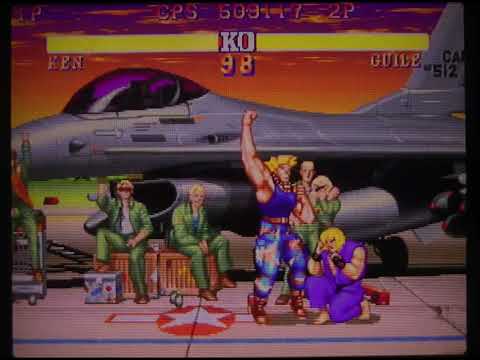
Higher end TVs have a form of BFI that is adaptive and maintains brightness very well (don’t let that scare you; it doesn’t add input lag). To me, looks as good as true BFI.
the only issue with crts is that after so many years they are pose a health hasard. Not a coincidence that eg with older pc monitors, computer science teachers at schools, office employees etc who used those old monitors for work, used to receive unsanitary work benefit.