Koko-aio shader discussions and updates

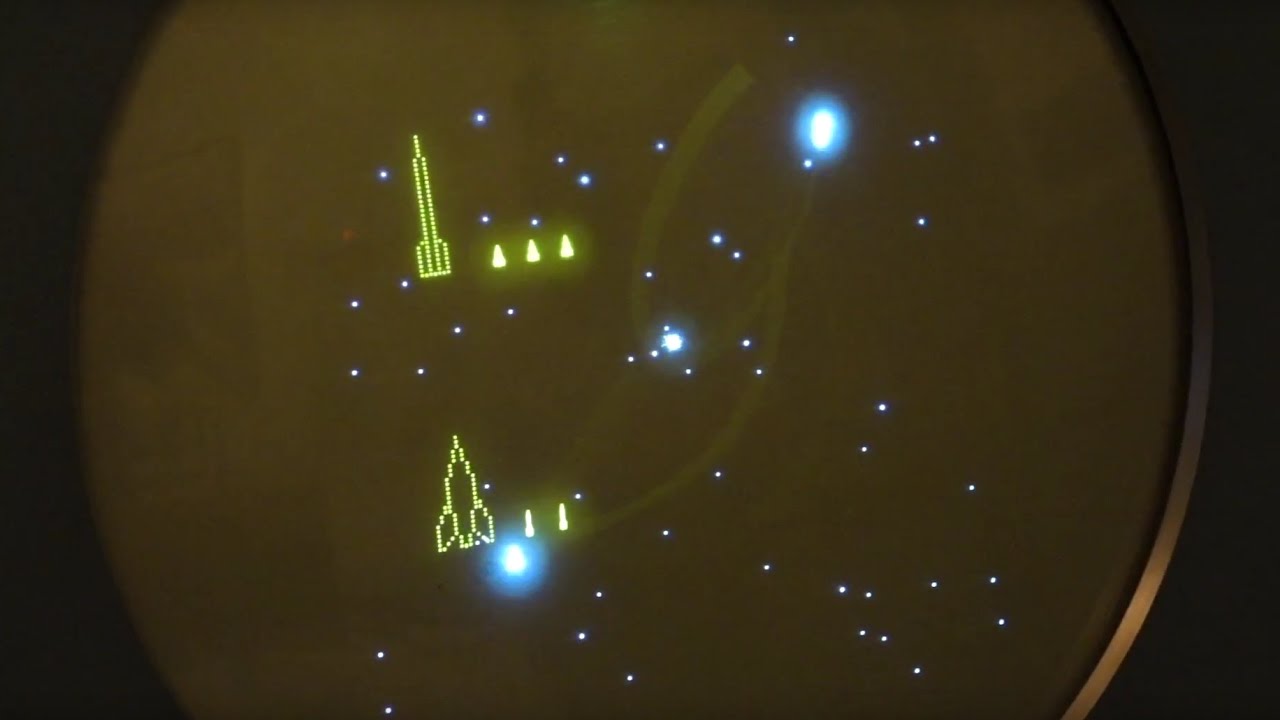
I’m facing a mirror glitch with phosphor persistence on with PDP-1 Spacewar (MAME):

Here's the full preset:
shaders = "17"
shader0 = "shaders_slang/bezel/koko-aio/shaders-ng/colortools_and_ntsc_pass.slang"
alias0 = "colortools_and_ntsc_pass"
wrap_mode0 = "mirrored_repeat"
mipmap_input0 = "false"
filter_linear0 = "true"
float_framebuffer0 = "true"
srgb_framebuffer0 = "false"
scale_type_x0 = "source"
scale_x0 = "1.000000"
scale_type_y0 = "source"
scale_y0 = "1.000000"
shader1 = "shaders_slang/bezel/koko-aio/shaders-ng/fxaa.slang"
alias1 = "upscale_pass"
wrap_mode1 = "mirrored_repeat"
mipmap_input1 = "true"
filter_linear1 = "true"
float_framebuffer1 = "true"
srgb_framebuffer1 = "false"
scale_type_x1 = "source"
scale_x1 = "2.000000"
scale_type_y1 = "source"
scale_y1 = "2.000000"
shader2 = "shaders_slang/bezel/koko-aio/shaders-ng/shift_and_bleed.slang"
alias2 = "shift_and_bleed_pass"
wrap_mode2 = "mirrored_repeat"
mipmap_input2 = "false"
filter_linear2 = "true"
float_framebuffer2 = "true"
srgb_framebuffer2 = "false"
scale_type_x2 = "source"
scale_x2 = "1.000000"
scale_type_y2 = "source"
scale_y2 = "1.000000"
shader3 = "shaders_slang/bezel/koko-aio/shaders-ng/in_glow_x.slang"
alias3 = "in_glow_pass_x"
wrap_mode3 = "clamp_to_edge"
mipmap_input3 = "false"
filter_linear3 = "true"
float_framebuffer3 = "true"
srgb_framebuffer3 = "false"
scale_type_x3 = "source"
scale_x3 = "1.000000"
scale_type_y3 = "source"
scale_y3 = "1.000000"
shader4 = "shaders_slang/bezel/koko-aio/shaders-ng/in_glow_y.slang"
alias4 = "in_glow_pass"
wrap_mode4 = "clamp_to_border"
mipmap_input4 = "false"
filter_linear4 = "true"
float_framebuffer4 = "true"
srgb_framebuffer4 = "false"
scale_type_x4 = "source"
scale_x4 = "1.000000"
scale_type_y4 = "source"
scale_y4 = "1.000000"
shader5 = "shaders_slang/bezel/koko-aio/shaders-ng/halo_pre_gamma.slang"
alias5 = "halo_pre_gamma_pass"
wrap_mode5 = "clamp_to_border"
mipmap_input5 = "false"
filter_linear5 = "true"
float_framebuffer5 = "true"
srgb_framebuffer5 = "false"
scale_type_x5 = "source"
scale_x5 = "1.000000"
scale_type_y5 = "source"
scale_y5 = "1.000000"
shader6 = "shaders_slang/bezel/koko-aio/shaders-ng/halo.slang"
alias6 = "halo_pass"
wrap_mode6 = "clamp_to_border"
mipmap_input6 = "false"
filter_linear6 = "true"
float_framebuffer6 = "true"
srgb_framebuffer6 = "false"
scale_type_x6 = "source"
scale_x6 = "1.000000"
scale_type_y6 = "source"
scale_y6 = "1.000000"
shader7 = "shaders_slang/bezel/koko-aio/shaders-ng/avglum_pass.slang"
alias7 = "avglum_pass"
wrap_mode7 = "clamp_to_border"
mipmap_input7 = "false"
filter_linear7 = "true"
float_framebuffer7 = "true"
srgb_framebuffer7 = "false"
scale_type_x7 = "source"
scale_x7 = "0.500000"
scale_type_y7 = "source"
scale_y7 = "0.500000"
shader8 = "shaders_slang/bezel/koko-aio/shaders-ng/reflection_blur_pre.slang"
alias8 = "reflected_blurred_pass_pre"
wrap_mode8 = "clamp_to_border"
mipmap_input8 = "false"
filter_linear8 = "true"
float_framebuffer8 = "false"
srgb_framebuffer8 = "false"
scale_type_x8 = "source"
scale_x8 = "1.000000"
scale_type_y8 = "source"
scale_y8 = "1.000000"
shader9 = "shaders_slang/bezel/koko-aio/shaders-ng/reflection_blur.slang"
alias9 = "reflected_blurred_pass"
wrap_mode9 = "mirrored_repeat"
mipmap_input9 = "false"
filter_linear9 = "true"
float_framebuffer9 = "true"
srgb_framebuffer9 = "false"
scale_type_x9 = "source"
scale_x9 = "1.000000"
scale_type_y9 = "source"
scale_y9 = "1.000000"
shader10 = "shaders_slang/bezel/koko-aio/shaders-ng/bloom_pass_1.slang"
alias10 = "bloom_pass_1"
wrap_mode10 = "mirrored_repeat"
mipmap_input10 = "false"
filter_linear10 = "true"
float_framebuffer10 = "false"
srgb_framebuffer10 = "false"
scale_type_x10 = "source"
scale_x10 = "1.000000"
scale_type_y10 = "source"
scale_y10 = "1.000000"
shader11 = "shaders_slang/bezel/koko-aio/shaders-ng/bloom_pass_2.slang"
alias11 = "bloom_pass_2"
wrap_mode11 = "clamp_to_edge"
mipmap_input11 = "false"
filter_linear11 = "true"
float_framebuffer11 = "false"
srgb_framebuffer11 = "false"
scale_type_x11 = "source"
scale_x11 = "0.500000"
scale_type_y11 = "source"
scale_y11 = "0.500000"
shader12 = "shaders_slang/bezel/koko-aio/shaders-ng/bloom_pass_3.slang"
alias12 = "bloom_pass_3"
wrap_mode12 = "clamp_to_edge"
mipmap_input12 = "false"
filter_linear12 = "true"
float_framebuffer12 = "false"
srgb_framebuffer12 = "false"
scale_type_x12 = "source"
scale_x12 = "1.000000"
scale_type_y12 = "source"
scale_y12 = "1.000000"
shader13 = "shaders_slang/bezel/koko-aio/shaders-ng/bloom_pass_4.slang"
alias13 = "bloom_pass_final"
wrap_mode13 = "mirrored_repeat"
mipmap_input13 = "false"
filter_linear13 = "true"
float_framebuffer13 = "true"
srgb_framebuffer13 = "false"
scale_type_x13 = "source"
scale_x13 = "1.000000"
scale_type_y13 = "source"
scale_y13 = "1.000000"
shader14 = "shaders_slang/bezel/koko-aio/shaders-ng/ambi_temporal_pass.slang"
alias14 = "ambi_temporal_pass"
wrap_mode14 = "clamp_to_border"
mipmap_input14 = "false"
filter_linear14 = "true"
float_framebuffer14 = "true"
srgb_framebuffer14 = "false"
scale_type_x14 = "absolute"
scale_x14 = "96"
scale_type_y14 = "absolute"
scale_y14 = "64"
shader15 = "shaders_slang/bezel/koko-aio/shaders-ng/helper_pass.slang"
alias15 = "helper_pass"
wrap_mode15 = "mirrored_repeat"
mipmap_input15 = "false"
filter_linear15 = "true"
float_framebuffer15 = "true"
srgb_framebuffer15 = "false"
scale_type_x15 = "absolute"
scale_x15 = "128"
scale_type_y15 = "absolute"
scale_y15 = "128"
shader16 = "shaders_slang/bezel/koko-aio/shaders-ng/final_pass.slang"
alias16 = "final_pass"
wrap_mode16 = "clamp_to_edge"
mipmap_input16 = "false"
filter_linear16 = "true"
float_framebuffer16 = "false"
srgb_framebuffer16 = "false"
scale_type_x16 = "viewport"
scale_x16 = "1.000000"
scale_type_y16 = "viewport"
scale_y16 = "1.000000"
IN_GLOW_GAMMA = "2.200000"
DO_CCORRECTION = "1.000000"
IN_GLOW_POWER = "1.500000"
TEMPERATURE = "7200.000000"
COLOR_MONO_COLORIZE = "0.600000"
COLOR_MONO_HUE_BIAS = "-1.000001"
SAT_BLEED_PAL = "1.000000"
SAT_BLEED_STRENGTH = "0.500000"
SAT_BLEED_SIZE = "3.000000"
DO_PPERSISTENCE = "1.000000"
OFFSET_STRENGTH = "0.250000"
DECON_GX = "1.600000"
RESSWITCH_SYNC_SPEED = "1.000000"
IN_GLOW_BIAS = "0.000000"
IN_GLOW_SPREAD = "1.500000"
IN_GLOW_SPREAD_SHARPNESS = "1.750000"
IN_GLOW_W = "-1.050000"
IN_GLOW_H = "-1.050000"
IN_GLOW_WARPSHARP_X = "0.400000"
MIN_LINES_INTERLACED = "0.000000"
PIXELGRID_INTR_DISABLE_Y = "2.000000"
PIXELGRID_INTR_FLICK_MODE = "0.000000"
DO_PIXELGRID_H = "0.000000"
PIXELGRID_COREY_FAKE_SCAN = "0.000000"
DO_PIXELGRID_W = "0.000000"
PIXELGRID_H_PRST = "2.000000"
PIXELGRID_Y_MASK = "0.000000"
PIXELGRID_Y_MASK_SHIFT = "0.120000"
PIXELGRID_Y_MASK_STEEP = "8.000000"
PIXELGRID_Y_MASK_ON_WHITE = "0.000000"
HALO_POWER = "0.990000"
HALO_SHARPNESS = "6.000000"
HALO_GAMMA = "1.400000"
HALO_VS_SCAN = "1.000000"
DO_BLOOM = "1.000000"
BLOOM_MIX = "0.800000"
DO_CURVATURE = "1.000000"
GEOM_WARP_X = "0.570000"
GEOM_WARP_Y = "0.810000"
GEOM_CORNER_SIZE = "0.013000"
GEOM_CORNER_SMOOTH = "200.000000"
BEZEL_R = "-0.310000"
BEZEL_G = "-0.310000"
BEZEL_B = "-0.310000"
BEZEL_REFL_STRENGTH = "0.330000"
BEZEL_RFL_BLR_SHD = "-0.350000"
BEZEL_ROUGHNESS = "2.000000"
BEZEL_RFL_CONTRAST = "1.500000"
BEZEL_DIFFUSION_STR = "0.170000"
BEZEL_SPCL_STRENGTH = "0.350000"
DO_GLOBAL_SHZO = "1.000000"
GLOBAL_OFFX = "-0.224999"
GLOBAL_ZOOM = "0.728500"
DO_BACKDROP = "0.200000"
BACKDROP_JUST_TUBE = "1.000000"
DO_BG_IMAGE = "1.000000"
BG_IMAGE_WRAP_MODE = "1.000000"
DO_AMBILIGHT = "0.000000"
V_SIZE = "1.080000"
V_SHAPE = "0.800000"
DO_SPOT = "1.000000"
S_POWER = "0.067000"
DO_DYNZOOM = "0.000000"
DO_GAME_GEOM_OVERRIDE = "1.000000"
GAME_GEOM_VSHIFT = "2.379998"
textures = "monitor_body_curved;monitor_body_straight;bg_under;bg_over;backdrop;sideshade"
monitor_body_curved = "Duimon-koko-aio/Graphics/_bezel/bezel_curved.png"
monitor_body_curved_mipmap = "true"
monitor_body_curved_linear = "true"
monitor_body_curved_wrap_mode = "clamp_to_edge"
monitor_body_straight = "Duimon-koko-aio/Graphics/_bezel/bezel_straight.png"
monitor_body_straight_mipmap = "true"
monitor_body_straight_linear = "true"
monitor_body_straight_wrap_mode = "clamp_to_edge"
bg_under = "Duimon-koko-aio/Graphics/PDP-1/PDP-1_Alt.jpg"
bg_under_mipmap = "false"
bg_under_linear = "true"
bg_under_wrap_mode = "mirrored_repeat"
bg_over = "shaders_slang/bezel/koko-aio/textures/background_over.png"
bg_over_mipmap = "false"
bg_over_linear = "true"
bg_over_wrap_mode = "mirrored_repeat"
backdrop = "params/config-koko/Screen_tweaks/Tube_Style/Duimon/phosphor.png"
backdrop_mipmap = "false"
backdrop_linear = "true"
backdrop_wrap_mode = "mirrored_repeat"
sideshade = "shaders_slang/bezel/koko-aio/textures/side_shade-helper.png"
sideshade_mipmap = "false"
sideshade_linear = "true"
sideshade_wrap_mode = "mirrored_repeat"

I’m refrencing "Presets-4.1\FXAA-bloom.slangp". I like to tweak that one for custom vector presets and similar stuff.

I can’t understand…

oh, maybe I got it, do you mean the repeating image?

1 Like

Yeah at the bottom. It looks similar to screen burn.

What game?

Why are you using override screen geometry with Y shifting?

This is what is triggering the bug, but I’m not sure you need that anyway.

–edit–

Bug is fixed in main on development repo; the content shifting in your preset is still present, and it is eating screen content, if it is what you want, it should be all set now (i used default assets and a wrong game, probably?).

1 Like

It’s not an arcade game, but rather an interesting piece of history that we can emulate with mame. PDP-1 Spacewar is Probably the first “video” game in history.

Thanks. I do need the geometry override to hide an unwanted white area of the screen. It’s too bright and distracting otherwise.

1 Like

Any suggestions on how to achieve this clean dots look?

maxresdefault~01

No way.

Vector hardware paints isolated points much brighter then lines, but cores do not, so the shader should guess by its own and I tried hard, but it is a very heavy operation.

2 Likes

I have to say this look right here is so damn sexy the way you got the bloom dialed in. I’m a sucker for stylish looks, I could get lost playing a bunch of games looking like this. I wonder if I could replicate this look myself.

4 Likes

Hey thanks!

Truth to be said tho, it was specifically tuned for that content.

Often i find myself to think that we should do specific shaders for specific content, not fot the sake of accuracy emulation, bit just to enhance them, case by case.

4 Likes

Yet I would love to see “system accurate” presets for koko-aio (SNES / Genesis / PS1 / Etc), but for 1080p.

Dot crawl, ntsc artifacts and CVBS color bleeding as long as lot of more “tools” are there waiting to be tuned.

I did what I could, but I’m from PAL regions.

1 Like

Is there an “extended” or ultrawide version of this background image? Currently it mirrors itself on the left and right sides

Sorry, I’ve not.

You can still make the background black so it will not repeat with this shader parameter:

"Wrap mode: default, clamp to border, edge, repeat"

I was wondering, for the ANTIBURN_COMPLETE is there a way I can verify it’s working correctly? I’ve got a new LG G5 OLED and I’m a bit paranoid. I assume with it applying to the whole screen, that includes the frame around the content and the content itself?

Thank you for this incredible shader. My go to setup was the Mister + RT4K, but now that I’m getting into JRPGs again, having fast forward and save states is such a game changer, and this shader experience is delicious icing on the cake!

1 Like

Hey thanks, I’m glad you find it useful.

config/config-user-optional-template.txt:

// If ANTIBURN_COMPLETE is enabled, not only the content, but the whole screen will shake.

if you haven’t read it, from docs-ng.md file:

Antiburn protection
By enabling this options, shader will slowly shake the content over Y/X axis to prevent image retention on affected screens like OLEDs.
To use it, in file config-user-optional.txt, write one or both:
#define ANTIBURN_Y 1.0
#define ANTIBURN_X 1.0

(1.0 is the effect speed).

By enabling the following, not just the content, but the whole screen will shake:
#define ANTIBURN_COMPLETE
The following modulates the shake size:
#define ANTIBURN_AMPLITUDE 1.0

So to verify it is working, just look very closely to a still picture, you should see it moving according to the defines you made.

Big numbers will help you to verify ofc.

But as a side note, once you have ambilight emabled and not a still picture for days, you should be fine evem without antiburn, since the bezel itself will be slightly colorized by the content.

The only thing you may bother with is the little gap between the game and the reflections, but you can easilly make it zero by operating on the frame alignment parameter in the bezel section. or the content zoom in the override content geometry section.

2 Likes

Thank you so much for the input. I set X and Y to 20 and amplitude to 100 and the whole image was moving around smoothly like one of those old DVD logos, so that verified it was working great. I’ve reduced the values to X=1, Y=1, amplitude=10 and from a normal seating distance I don’t see anything move. When I look closely I see it subtly shift a pixel every few seconds. Definitely brings peace of mind. The hard edged lines of reflections at the edges of the bezels were my main concern. Thanks again for this super cool project!

1 Like

Here’s my take on a Virtual Boy preset based on closeup photos, and “technical details” of the real thing; to the best of my ability / knowledge. I also tweaked the ambilight feature to look good in a balanced way between bright vs dim scenes:


Refrences (resourcess and camera shots online are a mess):


I made a PR request if koko finds it suitable.

Here’s the preset, save it as VirtualBoy.slangp and copy it into “koko-aio/Presets_Handhelds-ng”.

VirtualBoy.slangp
#reference "../koko-aio-ng.slangp"

IN_GLOW_GAMMA = "2.20"

DO_CCORRECTION = "1.000000"
	TEMPERATURE = "7200.000000"

RESSWITCH_SYNC_SPEED = "1.000000"

DO_IN_GLOW = "1.000000"
	IN_GLOW_BIAS = "0.000000"
	IN_GLOW_SPREAD = "1.500000"
	IN_GLOW_SPREAD_SHARPNESS = "1.750000"
	IN_GLOW_W = "-1.050000"
	IN_GLOW_H = "-1.050000"
	IN_GLOW_WARPSHARP_X = "0.400000"

TATE = "2.000000"

MIN_LINES_INTERLACED = "0.000000"

DO_PIXELGRID = "1.000000"
	DO_PIXELGRID_H = "0.150000"
	DO_PIXELGRID_W = "0.000000"
	PIXELGRID_H_PRST = "2.000000"
	PIXELGRID_Y_MASK = "0.000000"

DO_HALO = "1.0"
	HALO_POWER = "0.500000"
	HALO_SHARPNESS = "3.999999"
	HALO_GAMMA_OUT = "1.150000"
	HALO_VS_SCAN = "1.000000"

DO_BLOOM = "1.000000"
	BLOOM_MIX = "0.360000"
	BLOOM_SIZE = "1.000000"
	BLOOM_GAMMA = "5.000000"
	BLOOM_OVER_WHITE = "0.000000"

DO_CURVATURE = "1.0"
	GEOM_WARP_X = "0.000000"
	GEOM_WARP_Y = "0.000000"
	GEOM_CORNER_SMOOTH = "800.000000"

DO_GLOBAL_SHZO = "1.000000"
	GLOBAL_OFFX = "0.0"
	GLOBAL_OFFY = "0.0"
	GLOBAL_ZOOM = "0.829000"

DO_AMBILIGHT = "1.0"
	AMBI_FALLOFF = "2.000000"
	AMBI_POWER = "0.150000"
	AMBI_SMP_INT_OFFSET = "0.100000"
	AMBI_STRETCH = "1.000000"
	AMBI_STRETCH_VERTICAL = "0.500000"
	AMBI_GAMMA = "2.500000"

DO_VIGNETTE = "1.000000"
	V_SIZE = "1.000000"
	V_POWER = "1.00"
	V_SHAPE = "1.000000"
	UNIFORMITY = "1.000000"

DO_SPOT = "0.000000"

ASPECT_X = "12.0"	
ASPECT_Y = "7.0"

DO_DYNZOOM = "0.0"
1 Like

Looks good! I’ll check it asap, but I think you made the PR to your own repo by mistake.

Do not bother with that, I’ll add it to the main repo.

Handhelds category or… what? lol.

1 Like

Oh my bad!

Lol. The Virtual Boy is indeed a different beast. But let’s go with handhelds as it leans more towards portability (with neck problems).

1 Like

They are colorized by the content as well :wink:

Also, I think (if my memory serves me well) they are also driven by the specularity parameter in the bezel section, so you can fade them away.